Best Instagram Email Finder for Agents 2026
Compare six Instagram email finders for AI agents, with real product screenshots, MCP and API options, pricing, use cases, copyable prompts and FAQs.
GTM@AIsa
Last updated:
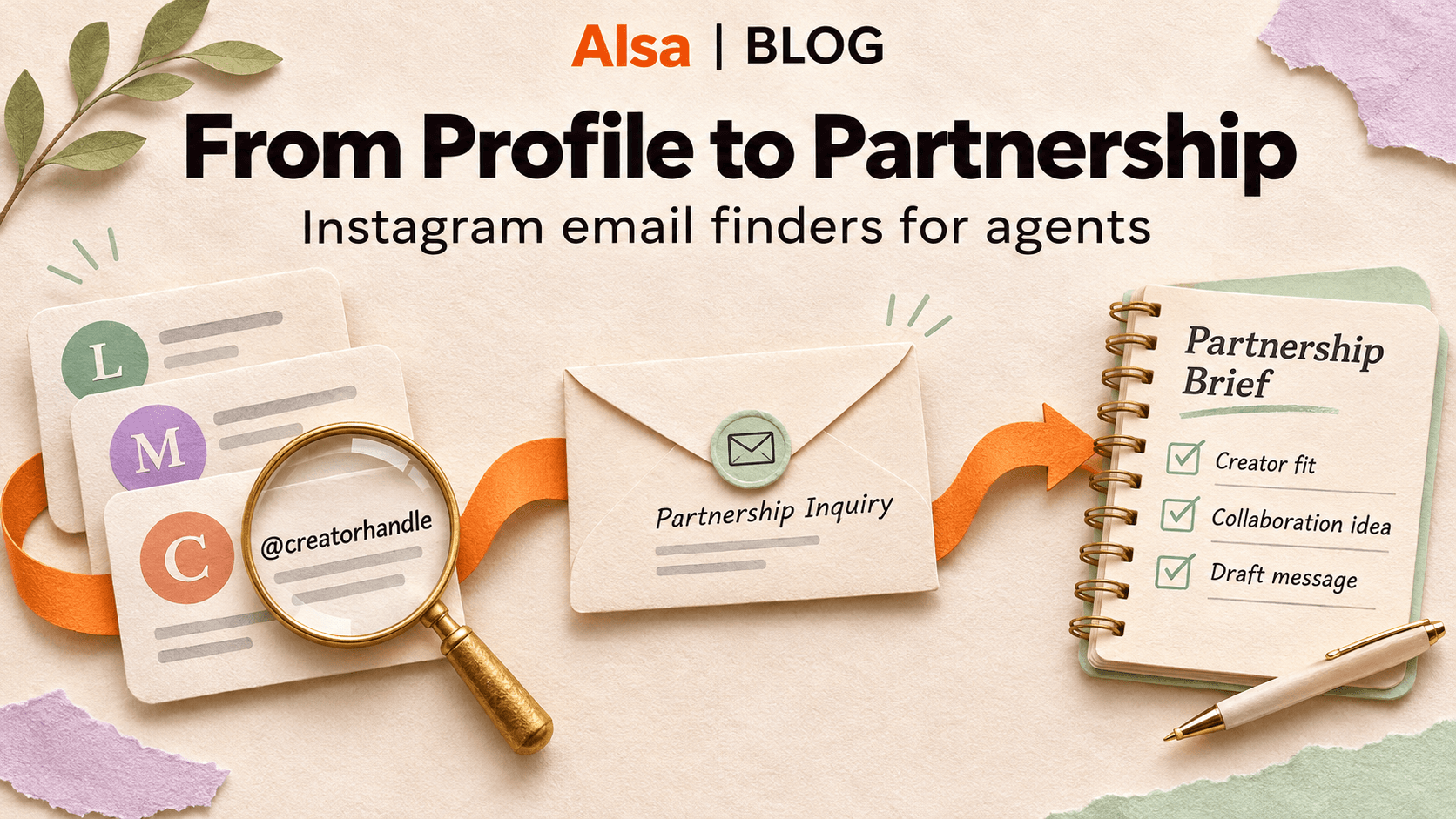
Disclosure: I work at AIsa. This guide uses official documentation, public product previews and screenshots of publicly accessible pages. The recommendations are my judgments about workflow fit, not a head-to-head benchmark of email accuracy or campaign performance.
The best Instagram email finder for agents is the one that helps your agent produce a usable partnership list. An address is part of that list. So are the right profile, evidence of a good fit, the contact's role and a reason to start a conversation.
I would start with AIsa when the request is, “Find creators for this product, get their available business contacts, then help me draft the approach.” I would make a different choice if the team already lives in Modash or Clay, or if the actual task is maintaining a custom scraping pipeline.
This is the same buying principle behind my social media management tools comparison: compare the work you need to finish, then look at the features. A connector badge or a large database number does not tell you how much work will remain after the first lookup.
The comparison at a glance
These six products overlap, but they sell different units of work. Some return contact records. Some organize campaigns. Others give you the tools to build an extraction process. Prices below are USD examples; yearly commitments and separate API contracts are labeled.
| Tool | Where I would use it | How an agent connects | Pricing model to check |
|---|---|---|---|
| AIsa | Creator research, contact lookup and reviewed outreach drafts | MCP or REST API | About $0.002 per profile lookup; valid empty results are billable. Research and other calls are separate. |
| Influencers.club | Creator-specific enrichment and linked social identities | MCP or API | Pro with API access starts at $208/month; endpoint credit costs differ. |
| Modash | Audience research and operating an influencer program | Platform MCP; separate APIs for custom applications | Essentials shows $199/month billed yearly, $2,388/year. Discovery API starts at $16,200/year separately. |
| Apify | Configurable public-profile extraction | MCP, API or SDK | Actor-specific pricing. The maintained profile scraper advertises from $1.60 per 1,000 profiles, not per found email. |
| PhantomBuster | Scheduled profile workflows with connected sessions | MCP or API | Start shows $56/month, $672 billed annually; execution time, slots and credits affect capacity. |
| Clay | Enrichment tables, shared qualification and operational handoffs | Agent plugin and CLI/API; MCP for supported workflows | Platform Actions and Data Credits; provider access and feature entitlements also matter. |
Sources: AIsa lookup, Influencers.club plans, Modash platform pricing, Modash API pricing, Apify Actor pricing, PhantomBuster plans and Clay pricing.
I would not compare the smallest number in each row and declare a winner. Processing 1,000 profiles, finding 1,000 available addresses and unlocking 1,000 qualified creator records are different deliverables. The useful denominator is the number of contacts your team can actually evaluate for the campaign.
What an Instagram email finder should help an agent finish
Imagine you sell a USB-C docking station. You want Instagram creators who demonstrate desk setups and laptop accessories. A list of popular technology accounts is a starting point, but it leaves several decisions unanswered.
Does the creator show products in use? Are their recent posts relevant to your market? Is the returned address for the creator, a manager or a general business inbox? What would you ask them to make? Has someone on your team already contacted them?
An effective agent workflow keeps those questions connected. I would evaluate five jobs:
- Discovery: find accounts that match the product and audience, with source profile links.
- Qualification: explain the fit using available content and audience evidence.
- Contact enrichment: look up missing addresses for the qualified shortlist.
- Review: preserve statuses, duplicates and uncertainties so a human can check the list.
- Handoff: produce a relevant draft and a clear next action for the person running outreach.
This changes the shopping question. Instead of asking which product can “find an Instagram email,” ask where your workflow currently gets stuck. If you already have a carefully selected list, discovery is less important. If you have only a product description, contact lookup alone will not solve the first half of the problem.
Finding an email, verifying it and getting a response are separate outcomes
A finder returns an address associated with a profile. Verification checks something about that address's status. A response depends on the recipient, the offer, timing and the quality of the message.
I keep those outputs in separate columns. Otherwise, a tidy spreadsheet can make several different levels of confidence look identical. An agent should preserve the provider's returned status and write “unknown” when it has no verification information.
There is another distinction worth keeping: a creator contact email is different from a private Instagram login email. The partnership workflow in this guide is about available contact information and appropriate business inquiries. None of the recommendations depend on identifying an account's private sign-in credentials.
Where creator contact workflows usually break
The most expensive mistakes are often organizational rather than technical. These are the failure points I would check in a trial, regardless of the product.
The list is easy to build and hard to explain
A broad search for “tech influencers” can produce plenty of profiles. It says little about whether those creators are good partners for a docking station. A general gadget commentator, a workstation reviewer and someone who films desk makeovers may offer very different collaboration opportunities.
Ask the agent to retain one specific reason for each match. “Creates content about technology” is weak. “Regularly demonstrates cable management and multi-monitor desk setups” is more useful, provided there is a real post or profile source behind it.
Every missing field triggers another paid lookup
An agent can accidentally pay twice for the same information if discovery already returned an email and a later step enriches every profile again. Duplicated handles and several creators sharing one management address can create similar problems.
I would deduplicate profiles before enrichment, reuse returned contacts and keep a lookup status for empty results. This is a workflow requirement you can test with a small list before increasing volume.
A successful call becomes a supposedly qualified lead
A returned record means the operation worked. It does not establish that the creator fits, the contact is current or the recipient wants the proposed collaboration.
The review should make the next decision obvious: ready to draft, needs audience research, needs a different published contact route, or unsuitable for this brief. Those labels are more useful than a single “success” column.
Automation hides the work that needs a person
A daily run can keep a list fresh, but someone still needs to decide what changes warrant action. A new address, an updated bio and a new sponsored post should not necessarily trigger the same follow-up.
Before scheduling anything, define the event you care about and the expected output. For an occasional product launch, a well-reviewed one-time list may be more useful than a recurring pipeline that nobody owns.
1. AIsa: my pick for research and email lookup inside your agent
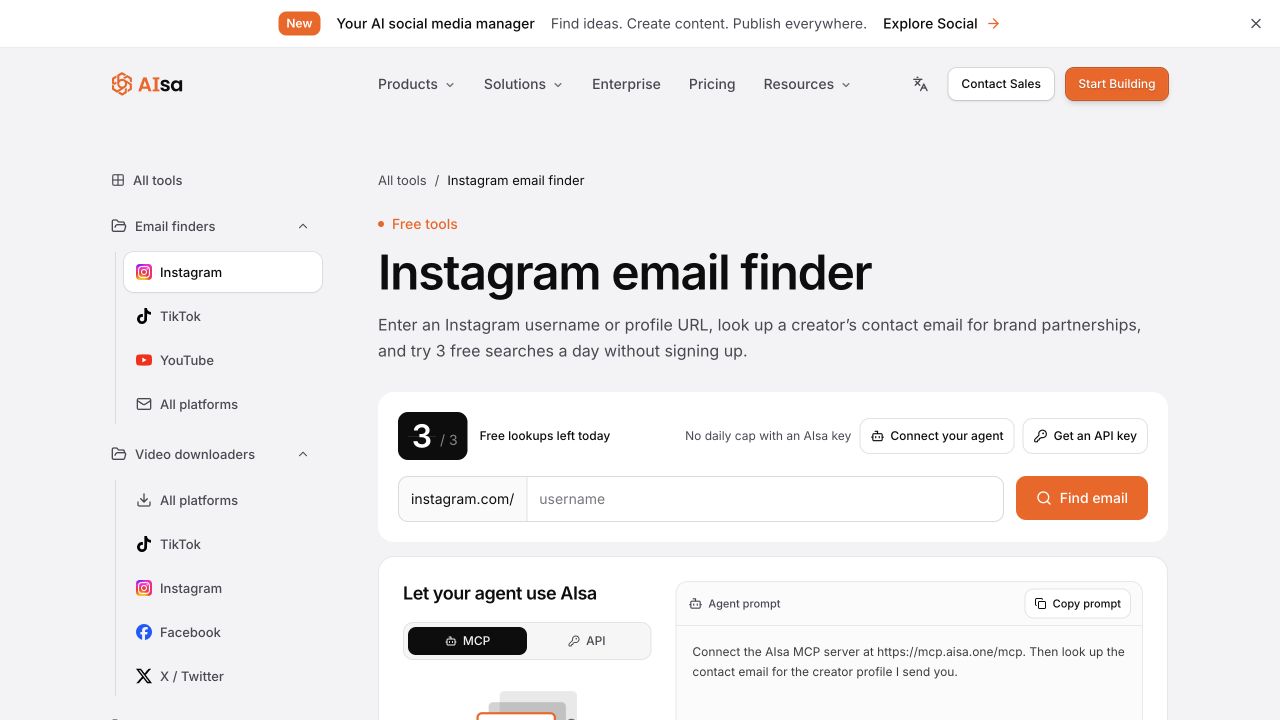
Source: AIsa's public Instagram email finder. The screenshot shows the lookup interface, without a submitted creator or a claimed match.
AIsa is the option I would start with when the brief begins before the contact list exists. The advantage is keeping the research, contact step and drafting in the agent you already use, rather than treating email lookup as an isolated export.
Its Creator AI Search accepts a natural-language creator brief. Once you have selected profiles, Waveinflu Email Lookup accepts one profile URL per call. The returned record includes the platform, normalized profile URL, email status and value.
That gives the agent a concrete record to work with. For example, it can preserve the original profile link, keep an empty lookup separate from an error and avoid inventing a contact when the provider returns no address.
Where I see the most value
For a creator partnership project, I would ask the agent to find accounts relevant to the product, explain the strongest matches, enrich only missing emails and prepare a short proposal grounded in each creator's content.
The value is the connection between those steps. A generic invitation beginning with “I love your content” is easy to generate. A draft explaining why a creator's recent desk-setup demonstration fits your docking station gives the reviewer something more substantial to assess.
The web finder also provides a simple starting point: enter a username or profile link and use the shared allowance of three fresh lookups per UTC day. It is useful for checking a few known profiles before connecting an agent. API and MCP usage instead draws on your AIsa balance.
What I would check before choosing it
A contact endpoint is only one resource in the workflow. Ask the agent which discovery, profile, content and lookup tools it will use. Keep their results separate enough to understand what each call established.
A valid not_found lookup is still billable. The empty result should remain visible in the list so it does not silently become a repeated expense. Email verification and sending also need their own supported tools; the lookup response alone does not complete either job.
My verdict: choose AIsa when you want to delegate the changing work around the email address, especially product-specific research and reviewed partnership drafts. Start with a small brief through Connect, then inspect the list before expanding it.
2. Influencers.club: for creator-specific enrichment and cross-platform context
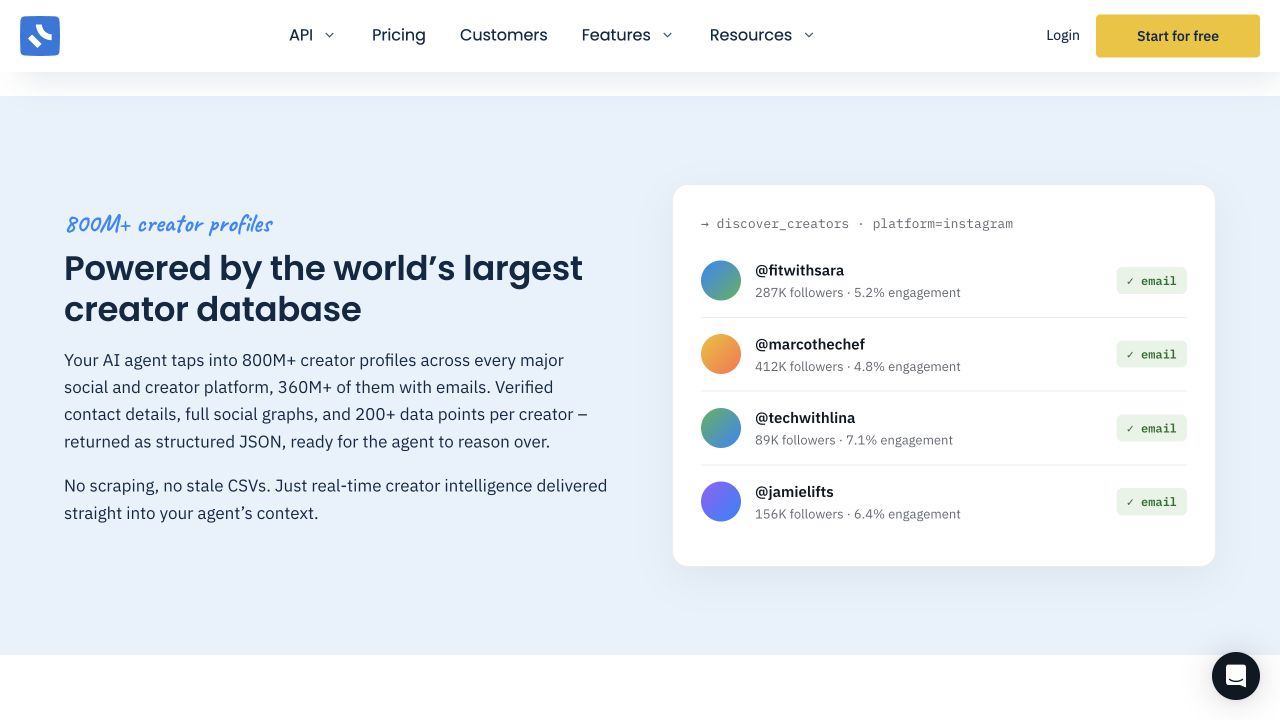
Source: Influencers.club's public MCP page. These are the vendor's demonstration records, not contacts retrieved for this article.
Influencers.club deserves a place on an agent-focused shortlist because its MCP integration directly exposes creator discovery and enrichment. This is a meaningful alternative to AIsa for a team whose main requirement is creator data.
I would look closely at it when the question is larger than “What is this Instagram account's email?” An Instagram handle can be one entry point into a creator's broader identity. Linked social profiles can help a team recognize that accounts on several platforms belong to the same person and keep the partnership record organized.
Choose the enrichment depth deliberately
The pricing and endpoint breakdown separates profile enrichment, analytics and fuller records. Its Pro plan with API access starts at $208/month. Profile enrichment and audience analytics have different credit costs and return different fields.
That matters in practice. If the campaign manager already approved the creators and only needs contact records, a deeper audience operation may add little to the immediate decision. If the team is still choosing partners, a contact-only lookup may leave the most important questions unanswered.
I would make the agent name the operation it plans to call and the fields it expects back. Then I would compare that output with the record the reviewer actually needs.
When I would choose it over a general resource layer
A creator-data product can be attractive when most of your recurring work is discovery, identity resolution and enrichment. There is less need to coordinate unrelated data sources or production tools, and more reason to standardize on one creator schema.
The trial question is whether that schema covers your market and niche. Test the creators you would actually contact. A broad database claim cannot establish the match rate on your particular list.
My verdict: shortlist Influencers.club when creator-specific depth and cross-platform identity are central to the workflow. Compare the exact enrichment operation with AIsa's simpler lookup and broader research workflow, rather than assuming both calls buy the same record.
3. Modash: for audience-aware creator selection and an existing campaign operation
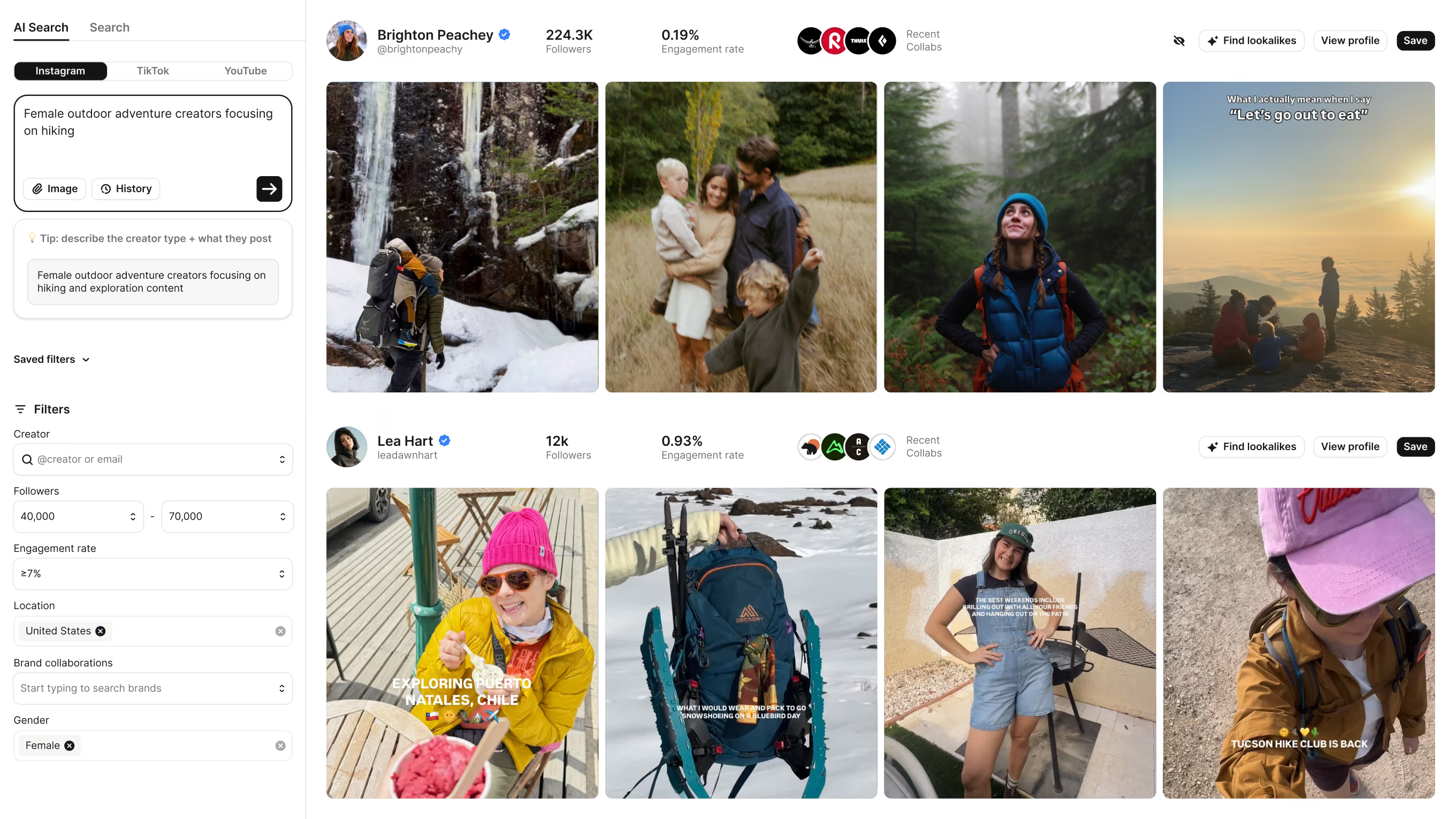
Official product preview: Modash influencer discovery. This is the vendor's public interface preview, not a campaign run for this guide.
Modash is the product I would examine when finding the address is a smaller part of choosing and managing the partnership. If your team needs to justify who should represent the brand, audience and content context can be more valuable than another contact export.
There is an important distinction for agents: Modash offers a platform MCP connector as well as separately sold APIs. Its MCP guide says paid platform users can connect AI tools without buying a separate API subscription. Email unlocks still use export credits, and profile or audience-report actions can consume profile credits.
Platform MCP and API access solve different jobs
For a marketer working inside an existing Modash account, MCP provides another way to search, review and organize the operation through an AI tool. The platform pricing page shows Essentials at $199/month billed yearly, or $2,388/year, with defined profile and email allowances.
For a team building a custom application or continuous data pipeline, the Discovery API and Raw API are separate products. The API price page lists Discovery from $16,200/year and Raw from $10,000/year.
It would be misleading to present that annual API figure as the minimum price for asking an agent to work with Modash. Decide whether you are operating a campaign account or building a product, then compare the relevant contract.
What I would evaluate in a trial
Bring a difficult selection question, such as finding creators with relevant viewers in your selling market, and ask the team to explain its choice from the available reports. Then check the cost of opening profiles and unlocking the contacts needed for that decision.
I would also check how the work passes from an agent conversation back to the campaign owner. If the team already manages creator relationships in Modash, keeping the list there may matter more than minimizing the price of an individual lookup elsewhere.
My verdict: choose Modash when audience-aware decisions and an ongoing creator operation justify the platform. Use its MCP for supported work in that account; evaluate API access separately when building custom software.
4. Apify: for building your own Instagram profile extraction workflow
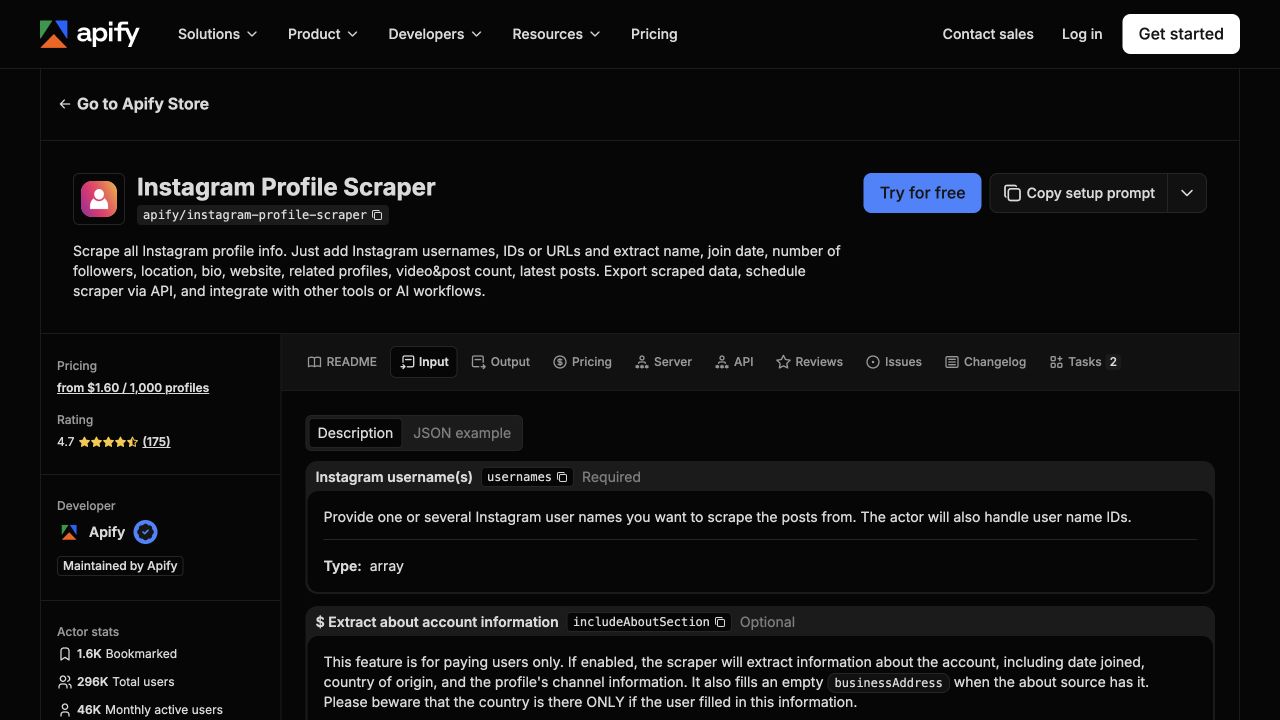
Source: Apify's maintained Instagram Profile Scraper input schema. This is a configuration reference, not a completed scrape.
Apify is useful when you want to own the extraction process. You choose an Actor, review its inputs and outputs, and connect the returned data to the rest of your system.
The maintained Instagram Profile Scraper returns public profile information, including contact details when listed in the bio. It advertises pricing from $1.60 per 1,000 profiles. The unit is important: a processed profile is not a found email, and neither is automatically a verified inbox.
The agent still needs to understand the Actor
Apify's MCP server lets compatible agents discover and run Actors and retrieve results. That can reduce the amount of integration work, but selecting the right Actor remains part of the task.
I would ask the agent to inspect the input schema before proposing a run. Does the tool accept handles or full URLs? Which fields will it return? Does the output contain the contact data you need, or will the next step need to inspect a published link or use enrichment elsewhere?
This is an attractive choice if you want profile context and contact extraction to be part of a broader pipeline. It is a less obvious choice if you want only a simple contact lookup and do not plan to maintain the surrounding process.
Where the extra control pays off
A developer may want raw fields retained for later analysis, a repeatable job definition, or structured results that feed another application. A marketer checking five profiles may prefer an interface that hides those details.
I would decide how much pipeline ownership is useful before comparing prices. Cheap extraction can still create work in normalizing records, handling empty fields and deciding which record is ready for outreach.
My verdict: choose Apify when configuration and reusable extraction are part of the value. Choose a dedicated enrichment workflow when you primarily want a contact result attached to an already qualified profile.
Watch: how an Instagram profile extraction run works
Apify's official tutorial, How to Scrape Instagram Profile Information, demonstrates inputs, running the Actor, exporting results and finding its integrations. It is a useful visual companion to the distinction between extracting a profile and qualifying a partnership contact.
The video is older than the current product pages. Use it to understand the sequence, then check today's inputs and pricing in the Actor documentation. It does not demonstrate a comparative email-accuracy test or an AIsa workflow.
Video by Apify. Watch the original tutorial on YouTube.
5. PhantomBuster: for repeatable profile automation you already know how to operate
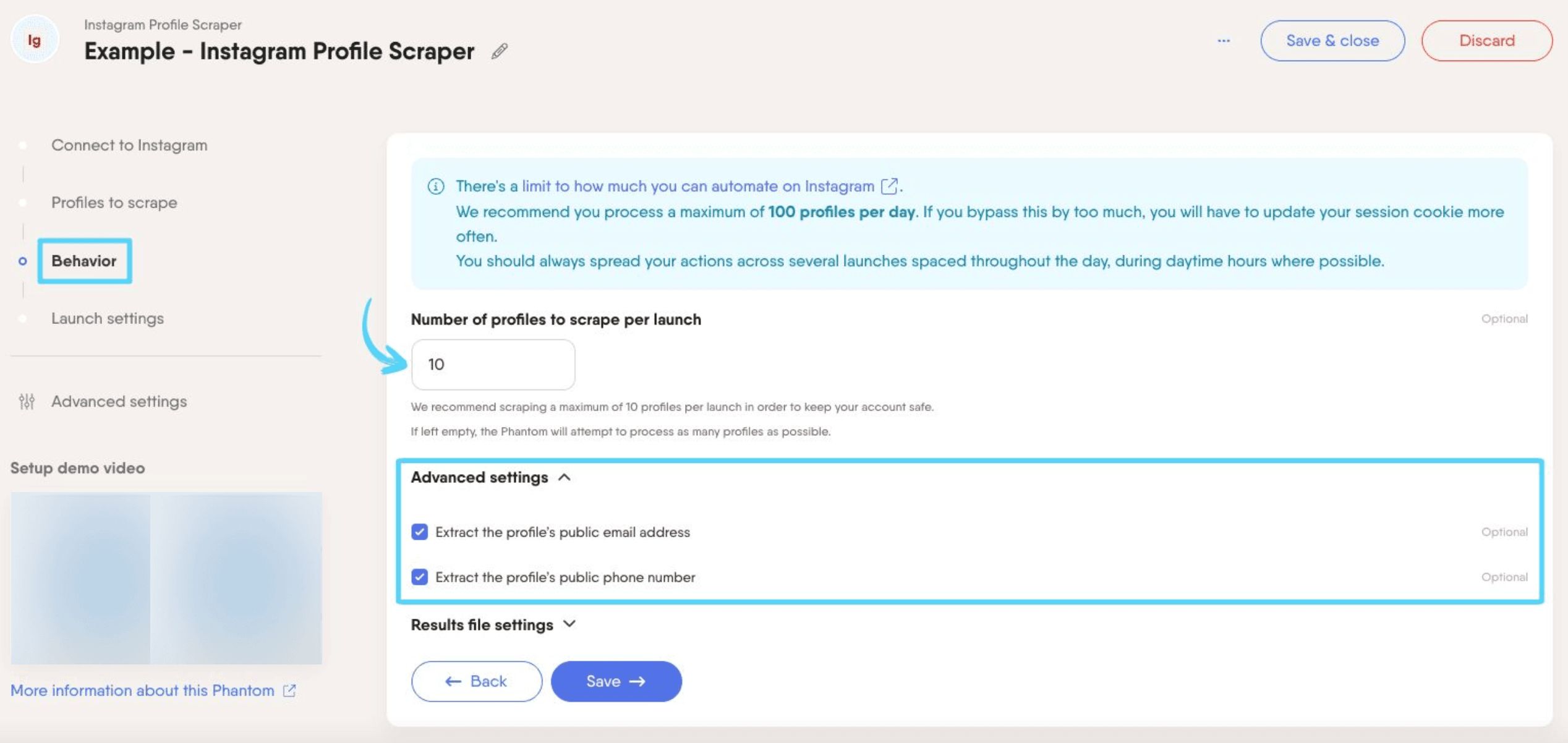
Official product screenshot: PhantomBuster's Instagram Profile Scraper tutorial.
PhantomBuster makes sense when recurring profile collection is already part of your operation. I would evaluate it as an automation workflow, with setup, scheduling and exported results, rather than as a contact database alone.
Its Instagram Profile Scraper guide requires a connected Instagram account and profile URLs. Public email extraction is an available option. That setup requirement is worth understanding before asking an agent to take over the task.
MCP does not remove the underlying setup
PhantomBuster's plans include MCP access, alongside execution time, automation slots and other resources. The Start example is $56/month when billed $672 annually.
An agent connection can help you operate a workflow. It does not make the connected session, extraction configuration or running capacity irrelevant. I would check which operation the agent can launch and how the team reviews the resulting file.
For a recurring list, decide what should happen on the next run. Are you adding new profiles, checking a known set or collecting changes? A useful automation has a defined input and a result someone owns, not just a timer.
When I would keep it on the shortlist
If the team already maintains several Phantoms, adding profile collection to that system may be easier than introducing another application. Familiarity with logs, scheduling and result exports can be a real operational advantage.
If the team has never used session-based automation and only wants a few emails, I would start with a smaller workflow first. The setup and maintenance should be justified by the recurring job, not by the existence of an automation template.
My verdict: choose PhantomBuster for a repeatable process your team is prepared to operate. Compare the full run, including setup and capacity, with a direct contact endpoint before choosing it for a one-time list.
6. Clay: for a shared creator enrichment table and GTM handoffs
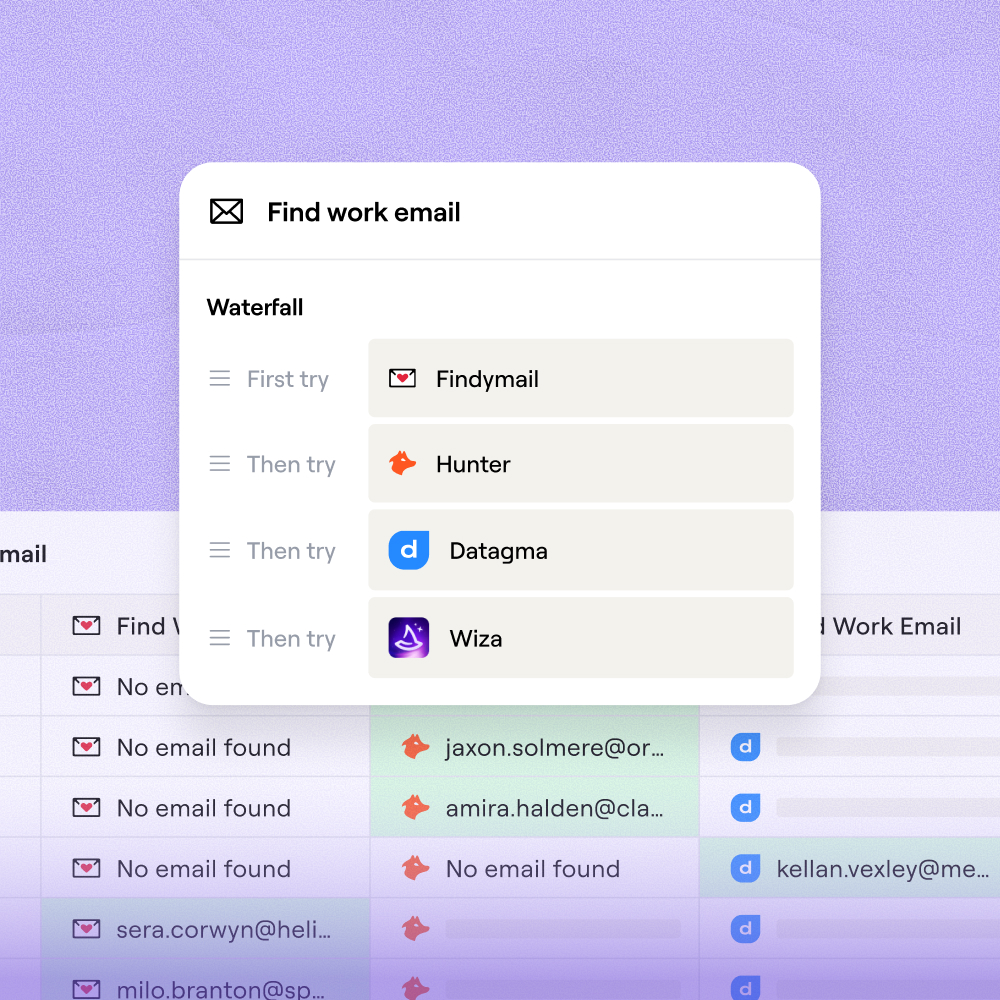
Official product preview: Clay waterfall enrichment. This illustrates the general email workflow; Instagram creator lookup uses a suitable creator-data integration, such as the one below.
Clay is the product I would consider when the important output is a shared operating table. In that setting, an email address is one field among qualification, campaign, owner, next action and outreach status.
Its Influencers.club integration provides a creator email action based on an existing profile URL. That is a more relevant starting point for Instagram creator contacts than assuming a name-and-company work-email waterfall will handle every social profile.
The table can be the product your team actually needs
A partnership team may want one reviewer to approve creators, another person to prepare the brief and an operator to track replies. Keeping those decisions in a table can be useful even when a chat agent handles some of the research.
I would design the columns before adding providers. Which fields decide fit? Who owns the next step? What stops a duplicate record from entering the same campaign twice? Those are table-design questions rather than email-finder features, but they affect whether enrichment becomes usable work.
Clay also offers an agent plugin and CLI/API and MCP workflows. Check the operations available through your chosen connection and plan. A general prospecting connector is not proof that every Instagram enrichment action can be invoked in exactly the same way.
What I would include in the cost comparison
Clay pricing separates platform Actions and Data Credits. The creator integration's documentation also describes Clay-provided access and an eligible bring-your-own-key route. Provider usage and platform work can therefore belong to different parts of the bill.
I would compare the full table: importing or sourcing profiles, filtering, enrichment, drafting and exporting. If several people work from that result every day, the operational value can outweigh a cheaper isolated lookup. If one person needs five contacts, it may be more structure than the task requires.
My verdict: choose Clay when the team needs a repeatable enrichment and handoff system. For a flexible one-person research brief, I would first try an agent conversation with a smaller contact workflow.
When should you use each product?

Illustration: choose the research and operating workflow before choosing the contact tool.
This is the section I would use to make the actual decision. You do not need to buy all six products, and you do not need a full creator platform to check a handful of profiles.
| Your situation | Where I would start | What I would verify first |
|---|---|---|
| You know the profiles and need a few contacts | AIsa web finder | Whether the returned contact fits the intended partnership inquiry |
| You have a product brief, but no creator shortlist | AIsa MCP | Discovery quality, source links and the handoff into lookup and drafting |
| Creator identity and linked profiles drive the project | Influencers.club | Fields and credit costs for the exact enrichment operation |
| Audience analysis and ongoing campaign management matter | Modash platform and MCP | Report and email allowances, account permissions and campaign fit |
| You are building a custom creator-data application | Modash API or an Apify pipeline | Output schema, contract scope and the integration work you will own |
| You need configurable public-profile extraction | Apify | Actor inputs, returned fields and cost per usable record |
| Your team already operates scheduled Phantoms | PhantomBuster | Connected-session setup, run capacity and result ownership |
| Several people work from one enriched creator table | Clay | Provider selection, Actions, Data Credits and handoff rules |
You only need five creator emails for a small launch
I would start with the smallest workable process. Review the profiles, try the AIsa Instagram email finder, and keep a short note about why each creator fits.
There is little benefit in designing a large enrichment system before you know what a good partner looks like. The immediate goal is a handful of relevant conversations, not the largest possible contact export. Move to API or MCP when the repeated manual steps become the bottleneck.
You want an agent to work from a product brief
I would begin with AIsa because the work starts with discovery and continues through several different resources. Ask for the research plan, then inspect the shortlist before requesting more contacts.
Influencers.club is also worth trialing if the brief is almost entirely about creator discovery and enrichment. Compare the same product brief in both workflows and review the reasons behind the selected profiles. A convincing paragraph is not a substitute for a source link.
You must defend the creator choice to a brand team
I would prioritize audience and selection evidence. Modash is a logical starting point for that brief, particularly when the team already runs campaigns there.
The question is no longer simply whether an email can be found. It is whether the creator's content and audience justify the partnership. Include the cost of opening the relevant reports in the comparison, then make contact lookup a later step for approved candidates.
You are building software rather than operating one campaign
I would write down the data contract first: inputs, fields, freshness, identifiers and expected failure behavior. Then I would examine the APIs or extraction pipeline that can satisfy it.
Modash's separately priced APIs and Apify's configurable Actors can be relevant for different parts of that work. An MCP connector can help during research and prototyping, but it should not be confused with a continuous production integration or an annual data contract.
You need a shared list with rules, owners and follow-ups
I would start by designing the table in Clay or in the team's existing system. An agent can help populate it, but the record structure should remain clear to the people responsible for the campaign.
If you already operate PhantomBuster and the recurring task is well-defined, keeping collection there can also make sense. The better choice is the one that the team can maintain and inspect, not the one with the most automation steps.
A practical agent workflow: from docking station brief to reviewed outreach

Conceptual workflow illustration. The prompts below are templates, not a claim that these campaigns or contacts have been generated.
Here is how I would structure a first run for a USB-C docking station. The product helps people whose laptops do not have enough ports. That creates a useful creator brief around desk setups, home offices, accessories and practical product demonstrations.
The aim is not to contact everyone talking about laptops. It is to prepare a small list where the reviewer understands the fit and can approve a specific collaboration idea.
Step 1: connect AIsa to the agent you already use
Start at Connect and follow the instructions for your client. A compatible OAuth client can open a browser authorization flow; other configurations may require an API key. Keep credentials in the client's supported settings.
For clients that can help configure a connection from a prompt:
Connect AIsa to your agent
Set up AIsa using https://aisa.one/llms.txt.
Connect the MCP server at https://mcp.aisa.one/mcp.
Guide me through the authorization steps supported by this client.
Keep any API key in the client's credential settings, not in a document.
This prompt is a setup request. It does not mean every client can install a connector automatically. The useful result is an authorized connection with access to the tools required by your brief.
Step 2: find creators who could demonstrate the product
Give the agent a product and a selection brief. Avoid starting with an arbitrary list of famous handles. For this example, I would ask for creators whose content shows how products are used, because a docking station needs a visible problem and demonstration.
Find Instagram creators for a docking station
Use AIsa to find up to 20 Instagram creators who publish in English
about desk setups, home offices or laptop accessories.

My product is a USB-C docking station that adds ports to a laptop.
Prioritize creators whose content demonstrates practical product use.
Return profile URLs, available audience and engagement fields,
and a specific reason each creator could fit this product.
Keep source links and mark unavailable fields as unknown.
Show the proposed paid tools and estimated cost before running them.
I would review the first list before asking for more. If too many accounts are general technology commentators, tighten the brief around demonstration formats. If the market is wrong, refine the geography or language criteria where the available tools support them.
Step 3: qualify the shortlist before paying for more contact data
Use the agent to make the decision legible. Ask for recent examples and a collaboration angle, rather than a confidence score with no explanation.
Check fit and keep the evidence
Review these shortlisted profiles: [profile URLs].
For each creator, inspect up to three available recent posts and retain
the original links. Separate observed facts from your interpretation.

Assess fit for a USB-C docking station: product demonstrations,
desk or laptop use cases, content language and available audience evidence.
Suggest one collaboration angle grounded in an actual post.
Return a shortlist for my review; do not infer missing audience demographics
or treat follower count as proof of buying intent.
A useful answer might identify a creator who films cable-management improvements and propose a before-and-after desk demonstration. It should point to the post that supports the observation. If the tool cannot retrieve enough content, that limitation belongs in the record.
Step 4: enrich only missing contacts and preserve the statuses
Now the lookup has a clear purpose. You are finding contact routes for approved candidates, not accumulating addresses for accounts that may never fit.
Look up missing contact emails
For these approved Instagram profiles: [profile URLs], deduplicate
the profile list and reuse any emails already returned by discovery.
Look up a contact email only where it is missing.

Return one row per profile with profile URL, contact email, provider,
lookup status and any verification information actually returned.
Keep not-found results and errors separate. Never guess an address.
Flag repeated management emails without deleting the creator records.
Do not send messages or repeat unsuccessful lookups automatically.
The reviewer should be able to see the difference between no address returned, a service error and a contact that needs verification. These are different next actions, even if all three leave the email column empty.
Step 5: turn research into a specific invitation
The research should improve the email, not merely decorate it with a first name. Ask the agent to propose a relevant format and include the facts the creator needs to decide whether to continue the conversation.
Draft a partnership invitation for review
For the five strongest approved matches, draft a short paid-partnership
invitation for my USB-C docking station. Reference one relevant post
using the retained source link and suggest a practical demonstration idea.

Use these confirmed campaign details: [brand], [product facts],
[deliverables], [timing], [budget or request for rates].
Do not invent specifications, past relationships or compliments.
Return a subject line, an email draft and any missing information
I need to provide. Keep each draft ready for my review; do not send it.
For the product description, include only specifications you can substantiate. If the dock's display support, charging performance or compatibility has not been confirmed, the agent should ask for it rather than turn an assumption into a selling point.
What a useful result should look like
I would expect a reviewable table rather than a long paragraph of recommendations. The following is a field checklist, not a fabricated live result.
| Field | What should appear | Why I keep it |
|---|---|---|
| Profile URL | The normalized Instagram profile | A stable reference for reviewing and deduplicating the record |
| Product fit | A concise reason supported by the creator's content | Explains why the person is on the shortlist |
| Evidence | Relevant original post or profile links | Lets the reviewer inspect the source |
| Contact email | The address actually returned, or an empty value | Keeps guesses out of the contact list |
| Contact context | Creator, manager, agency or unknown | Helps route the proposal appropriately |
| Lookup status | Returned status, including empty results or errors | Makes the next action clear |
| Verification | Provider-supplied information, or unknown | Prevents a lookup from masquerading as a delivery check |
| Collaboration angle | A product-specific idea grounded in the evidence | Connects research to the invitation |
| Review state | Needs review, approved or held | Keeps drafting and sending decisions separate |
Several creator records may legitimately share one management email. I would preserve those relationships and flag them for review. Deleting every duplicate address can hide who the manager represents; treating each as an unrelated recipient can lead to repetitive outreach.
I would also keep the contact record separate from the draft. The email may be correct while the offer is incomplete. That is a campaign-detail issue, not a reason to run the finder again.
What does the complete workflow cost?
A low lookup price helps only if you understand what the workflow buys. I would calculate both the cash cost and the work left for the team.
For a simple AIsa example, 100 valid profile lookups at approximately $0.002 each would total about $0.20 for the lookup step. That is arithmetic based on the published example price, not an executed campaign or a promise of 100 found emails. Discovery, profile or content retrieval, verification, model usage and other operations are additional.
Now imagine that only some returned addresses belong to creators who fit the campaign. The useful comparison is not price per call. It is the cost of producing a qualified, reviewable list.
Lookup match rate = profiles with a returned email / unique profiles processed

Cost per usable contact = total research and enrichment spend
                          / contacts approved for this campaign
Those are different measures. A provider can return an address without improving campaign fit, while a richer research workflow can improve the shortlist without increasing its raw email count.
Subscriptions can be the right choice at a predictable workload
For a team running creator campaigns every week, a subscription may buy useful consistency: a shared operating interface, defined allowances and a place to maintain relationships. I would compare those benefits with the work required to assemble the same process elsewhere.
For an occasional launch, a usage-based resource can be attractive because the team can start with a small list. Neither model wins automatically. Write down your monthly workload and include research, report views, contact unlocks, enrichment steps, exports and the people who need access.
Ask what happens to empty results
Billing rules for no-result calls differ by product and operation. AIsa's valid empty lookup remains billable. Elsewhere, an export, enrichment or verification action may follow a different rule.
Ask about the exact action you plan to use, then record empty results so the agent does not treat them as a reason to keep trying indefinitely. Repeating the same call without a meaningful change is rarely a useful outreach strategy.
Five practical checks before you choose an Instagram email finder
- Use your real niche. Test the languages, markets and creator formats you plan to work with. A sample of celebrity accounts tells you little about a niche product launch.
- Inspect the full record. Check profile identity, contact context, returned status and source links. A non-empty email column is only one part of the decision.
- Evaluate the agent's behavior. Confirm that it deduplicates, reuses existing results and separates lookup errors from valid empty responses.
- Price the complete monthly workload. Include the plan commitment, credits, execution time, research, reports and any separately configured services.
- Try the handoff. Have the person who runs outreach review the result. If they still have to reconstruct the evidence and campaign brief, the workflow is not finished.
Five terms that make the comparison clearer
- MCP: the Model Context Protocol, a standard connection between AI applications and external tools. It describes access, not the quality or coverage of a contact database.
- Enrichment: adding fields, such as a contact address or linked account, to a profile you already know.
- Waterfall: trying configured providers in sequence until the workflow finds a usable result or reaches its stopping condition.
- Verification: a separate assessment of an email address's status. Preserve the scope of the check instead of assuming it proves identity, fit or willingness to reply.
- Match rate: the share of processed profiles for which a provider returns the field you need. Measure it on your own list and define what counts as a match.
Frequently asked questions
What is the best Instagram email finder for AI agents in 2026?
I would start with AIsa for an agent-led workflow that combines creator research, contact lookup and reviewed partnership drafts. Influencers.club is a strong alternative for creator-specific enrichment. Modash suits deeper audience and campaign work; Apify, PhantomBuster and Clay suit different extraction and operational setups. The best choice depends on the work before and after the lookup.
Can I find an Instagram email address from a username?
Yes, some web finders accept a username or profile link. AIsa's web tool accepts both, while its underlying lookup endpoint takes a profile URL. Use the account's profile, not a Reel or post link, and keep the original profile reference with the returned contact.
Is there a free Instagram email finder without signing up?
The AIsa web finders share three fresh lookups per UTC day without registration. A valid empty result consumes a fresh lookup too. This website allowance is separate from paid API and MCP usage, which uses your AIsa balance. For other tools, check the specific trial and export restrictions rather than assuming a free account includes ongoing enrichment.
Can ChatGPT or Claude find creator emails automatically?
A compatible agent can use connected tools to perform supported discovery and lookup operations. The connection still needs authorization, the data provider still determines coverage, and paid operations can consume credits. Ask the agent to return structured records and source links so you can review the result.
Does an MCP connector mean I need to write code?
Not necessarily. Hosted connectors can let a compatible client connect through its settings and an authorization flow. Other setups use configuration files, a local server or an API key. Follow the vendor's instructions for your actual client. A setup prompt is useful where the client supports it, but it is not a guarantee of automatic installation.
Does Modash require a $16,200 API contract to work with an agent?
No. Its platform MCP and separately sold APIs are different products. Modash's help documentation says paid platform users can use MCP without buying an API subscription. Profile and email actions still follow the relevant platform credit rules. The annual Discovery API figure applies to a separate programmatic data product.
Is every returned email verified?
No. Keep lookup status and verification information in separate fields. Some providers return verification-related data; others return an address without that assessment. If the record does not include verification, label it unknown instead of allowing the agent to infer that the inbox is deliverable.
Why would an Instagram email lookup return no address?
The provider may not have an email for that profile, or the selected extraction method may not expose one. That result does not establish what every other source or published contact route contains. Keep the empty status, check the profile and the creator's linked business contact routes where appropriate, and avoid guessing.
Which tool should I use for bulk Instagram email lookup?
Start with the output and operating model. AIsa can coordinate a list of one-profile lookups through an agent or API workflow. Influencers.club and Clay support creator enrichment use cases, while Apify and PhantomBuster provide configurable or scheduled extraction approaches. Evaluate deduplication, per-operation limits, empty-result billing and the final review process before increasing volume.
Are a bio email, a business contact email and a login email the same thing?
No. A bio may publish a contact route, a business address may belong to a manager or agency, and a login email is part of an account's authentication. This guide concerns creator contact workflows. Preserve the context of an address and use the business inquiry route the creator makes available.
Can I use Hunter or a company-email finder for Instagram creators?
A name-and-company-domain workflow can be useful for business contacts when those inputs are known. An Instagram creator may not have a known company domain or a corporate address pattern. I would choose a profile-based creator lookup for that task, then evaluate work-email tools separately if the partnership contact is a person at a known company. The input format should match the problem.
Does finding an email mean the agent should send the invitation?
Finding, drafting and sending are separate decisions. A lookup gives you a contact record, not a completed campaign review. Have the reviewer confirm the fit, contact route, offer and message. Sending then requires a configured mail tool and the appropriate authorization, with any requests to stop contact respected.
Can I use the same workflow for TikTok and YouTube creators?
The selection and review logic can transfer, but inputs, coverage and available fields depend on the tool and platform. AIsa provides dedicated TikTok, YouTube and multi-platform email-finder pages. Keep each platform's profile reference and review the returned contact in context.
How do I compare accuracy without trusting a vendor percentage?
Use the same representative shortlist, define the required fields and inspect the returned records. Separate identity mismatches, missing emails, verification status and campaign fit. A small test helps you choose a workflow; it should not be presented as an industry-wide accuracy ranking or a promise of future campaign results.
My recommendation
If you only need a few known profiles checked, start with a small web lookup. If your main challenge is creator identity and enrichment, compare Influencers.club. If audience evidence and an existing campaign operation drive the decision, examine Modash and its platform MCP. If you want to own the extraction pipeline, consider Apify; if your team already runs recurring Phantoms, evaluate PhantomBuster. If a shared enrichment table is the center of the work, look at Clay.
For the broader brief, “Find relevant creators for my product, get the available contacts and help me prepare a thoughtful approach,” I would start with AIsa. Keep the evidence, contact record and draft connected. That is the part of an agent-led workflow that makes the email address useful.