> ## Documentation Index
> Fetch the complete documentation index at: https://aisa.one/docs/llms.txt
> Use this file to discover all available pages before exploring further.
> ## Agent Instructions
> ## Agent Instructions (AIsa)
>
> - Base URLs: models `https://api.aisa.one/v1` (Gemini GenerateContent: `https://api.aisa.one/v1beta`); data APIs `https://api.aisa.one/apis/v1`. The `servers` of each operation in https://aisa.one/openapi.yaml is authoritative.
> - Auth: `Authorization: Bearer $AISA_API_KEY`. Never print, log, or commit the key.
> - MCP (preferred for agents): `https://mcp.aisa.one/mcp`, signed in with OAuth, so there is no key to paste.
> - Agent Skill: `npx skills add AIsa-team/agent-skills --skill aisa`. Fallback with the AIsa CLI: `aisa skills install aisa`.
> - Paid calls need approval first. Docs, https://aisa.one/models, https://aisa.one/api, `/v1/models`, and MCP discovery are free to read. Before any paid, dynamically priced, or high-cost call, state the exact scope, rate, and maximum USD exposure, then wait for a separate user message approving that scope and cap. A request to collect data is not approval; do not send unapproved probes. Full rule: https://aisa.one/docs/llms.txt
# 在 Grok Bot 中使用 AIsa
> 一段 prompt 加一次浏览器登录,在 Grok Bot 中把 AIsa 添加为 connector。
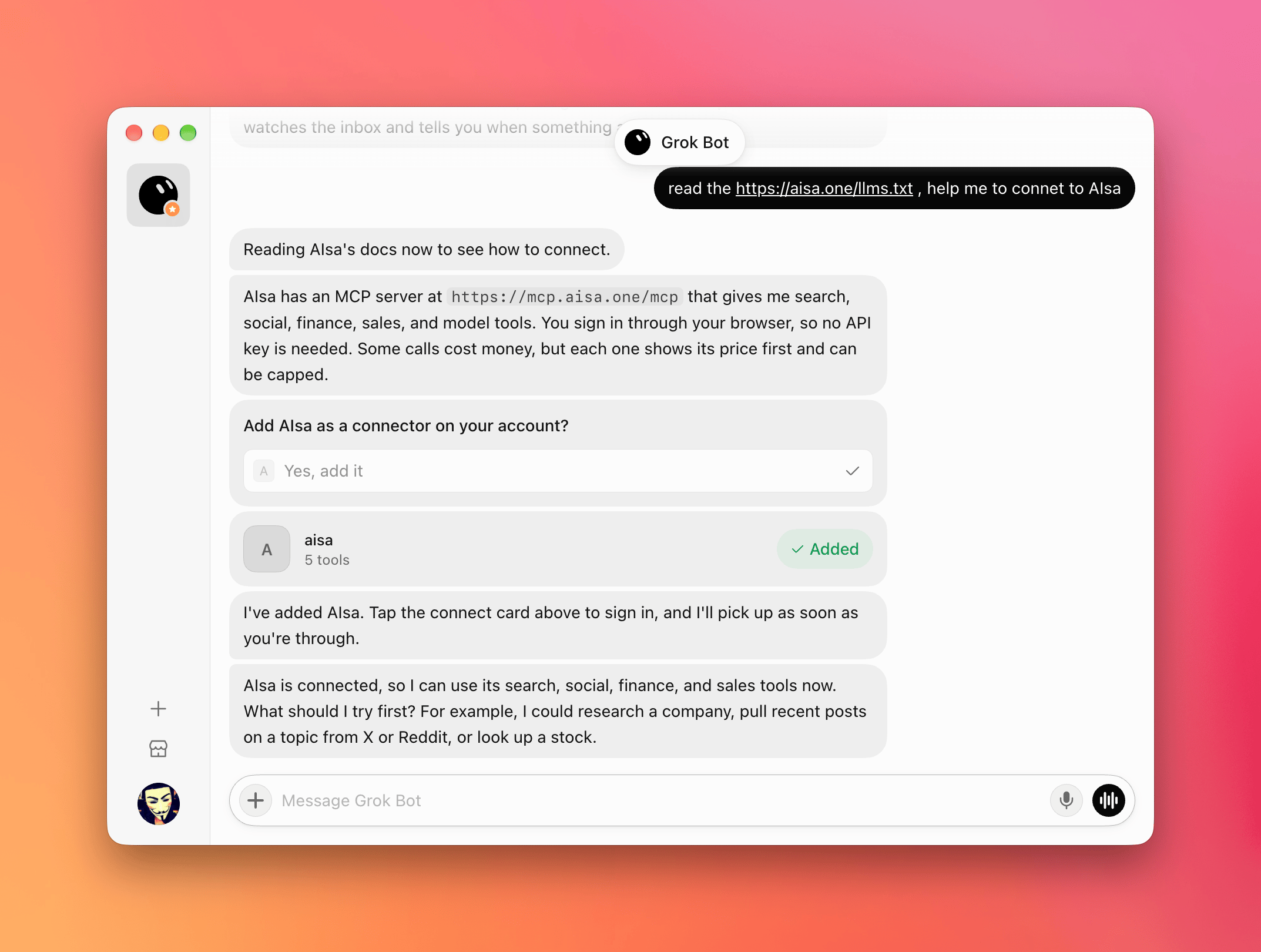
Grok Bot 可以把远程 MCP server 添加为账号上的 connector。让它读取 AIsa 面向 agent 的说明,确认添加 connector,在浏览器中登录一次,Grok Bot 就能代你调用 AIsa 能力——网页搜索、社交(X、Reddit)、金融、销售研究和模型等。
 ## 前置条件
开始前,请确认你已经具备:
* AIsa 账号([console.aisa.one](https://console.aisa.one))——通过浏览器登录,无需复制 API key
* Grok Bot
## 1. 让 Grok Bot 连接 AIsa
在 Grok Bot 中新建对话并发送:
```txt theme={null}
Read https://aisa.one/llms.txt and help me connect to AIsa.
```
Grok Bot 会读取 AIsa 面向 agent 的说明,找到 AIsa 的 MCP server:`https://mcp.aisa.one/mcp`。
## 2. 添加 connector
Grok Bot 会询问 **Add AIsa as a connector on your account?**,选择 **Yes, add it**。
对话中会出现 **aisa** connector 卡片,并显示 **Added**。
## 3. 通过浏览器登录
点击 **aisa** 连接卡片,在浏览器窗口中登录 AIsa 并授权。回到对话后,Grok Bot 会接上连接,并确认 AIsa 已连接。
浏览器登录让 API key 不出现在对话中。你可以随时撤销这个连接。
## 4. 使用 AIsa 能力
让 Grok Bot 获取任何 AIsa 能提供的数据,例如:
```txt theme={null}
Use AIsa to pull recent posts about AI agents from X and Reddit.
```
付费调用在执行前会先显示费用,并可设置上限。浏览目录免费;数据调用按次计费,从你的 AIsa 账户扣除。
## 快速参考
| 项目 | 值 |
| - | - |
| 设置 Prompt | `Read https://aisa.one/llms.txt and help me connect to AIsa.` |
| MCP server | `https://mcp.aisa.one/mcp` |
| 登录 | **Yes, add it** → 点击 **aisa** 连接卡片 → 在浏览器中登录 |
| API key | 不需要 |
| 计费 | 浏览目录免费;每次数据调用先报价,按次计费 |
## 故障排查
| 问题 | 解决方法 |
| - | - |
| Grok Bot 没有提出添加 connector | 让它把 `https://mcp.aisa.one/mcp` 添加为 connector |
| 登录窗口在完成前被关闭 | 再次点击 **aisa** 连接卡片 |
| Grok Bot 没有用 AIsa 处理请求 | 在 prompt 中明确写 "use AIsa" |
| 调用因余额不足失败 | 在[控制台](https://console.aisa.one)充值后,让 Grok Bot 重试 |
## 相关页面
用一段 prompt 把 Cue 连接到 AIsa。
在 Grok Build CLI 中把 AIsa 添加为远程 MCP server。
浏览 AIsa 向 agent 开放的能力。
This documentation is built and hosted on [Mintlify](https://mintlify.com), a developer documentation platform.
## 前置条件
开始前,请确认你已经具备:
* AIsa 账号([console.aisa.one](https://console.aisa.one))——通过浏览器登录,无需复制 API key
* Grok Bot
## 1. 让 Grok Bot 连接 AIsa
在 Grok Bot 中新建对话并发送:
```txt theme={null}
Read https://aisa.one/llms.txt and help me connect to AIsa.
```
Grok Bot 会读取 AIsa 面向 agent 的说明,找到 AIsa 的 MCP server:`https://mcp.aisa.one/mcp`。
## 2. 添加 connector
Grok Bot 会询问 **Add AIsa as a connector on your account?**,选择 **Yes, add it**。
对话中会出现 **aisa** connector 卡片,并显示 **Added**。
## 3. 通过浏览器登录
点击 **aisa** 连接卡片,在浏览器窗口中登录 AIsa 并授权。回到对话后,Grok Bot 会接上连接,并确认 AIsa 已连接。
浏览器登录让 API key 不出现在对话中。你可以随时撤销这个连接。
## 4. 使用 AIsa 能力
让 Grok Bot 获取任何 AIsa 能提供的数据,例如:
```txt theme={null}
Use AIsa to pull recent posts about AI agents from X and Reddit.
```
付费调用在执行前会先显示费用,并可设置上限。浏览目录免费;数据调用按次计费,从你的 AIsa 账户扣除。
## 快速参考
| 项目 | 值 |
| - | - |
| 设置 Prompt | `Read https://aisa.one/llms.txt and help me connect to AIsa.` |
| MCP server | `https://mcp.aisa.one/mcp` |
| 登录 | **Yes, add it** → 点击 **aisa** 连接卡片 → 在浏览器中登录 |
| API key | 不需要 |
| 计费 | 浏览目录免费;每次数据调用先报价,按次计费 |
## 故障排查
| 问题 | 解决方法 |
| - | - |
| Grok Bot 没有提出添加 connector | 让它把 `https://mcp.aisa.one/mcp` 添加为 connector |
| 登录窗口在完成前被关闭 | 再次点击 **aisa** 连接卡片 |
| Grok Bot 没有用 AIsa 处理请求 | 在 prompt 中明确写 "use AIsa" |
| 调用因余额不足失败 | 在[控制台](https://console.aisa.one)充值后,让 Grok Bot 重试 |
## 相关页面
用一段 prompt 把 Cue 连接到 AIsa。
在 Grok Build CLI 中把 AIsa 添加为远程 MCP server。
浏览 AIsa 向 agent 开放的能力。
This documentation is built and hosted on [Mintlify](https://mintlify.com), a developer documentation platform.