> ## Documentation Index
> Fetch the complete documentation index at: https://aisa.one/docs/llms.txt
> Use this file to discover all available pages before exploring further.
# Account Settings - 安全、账单与通知
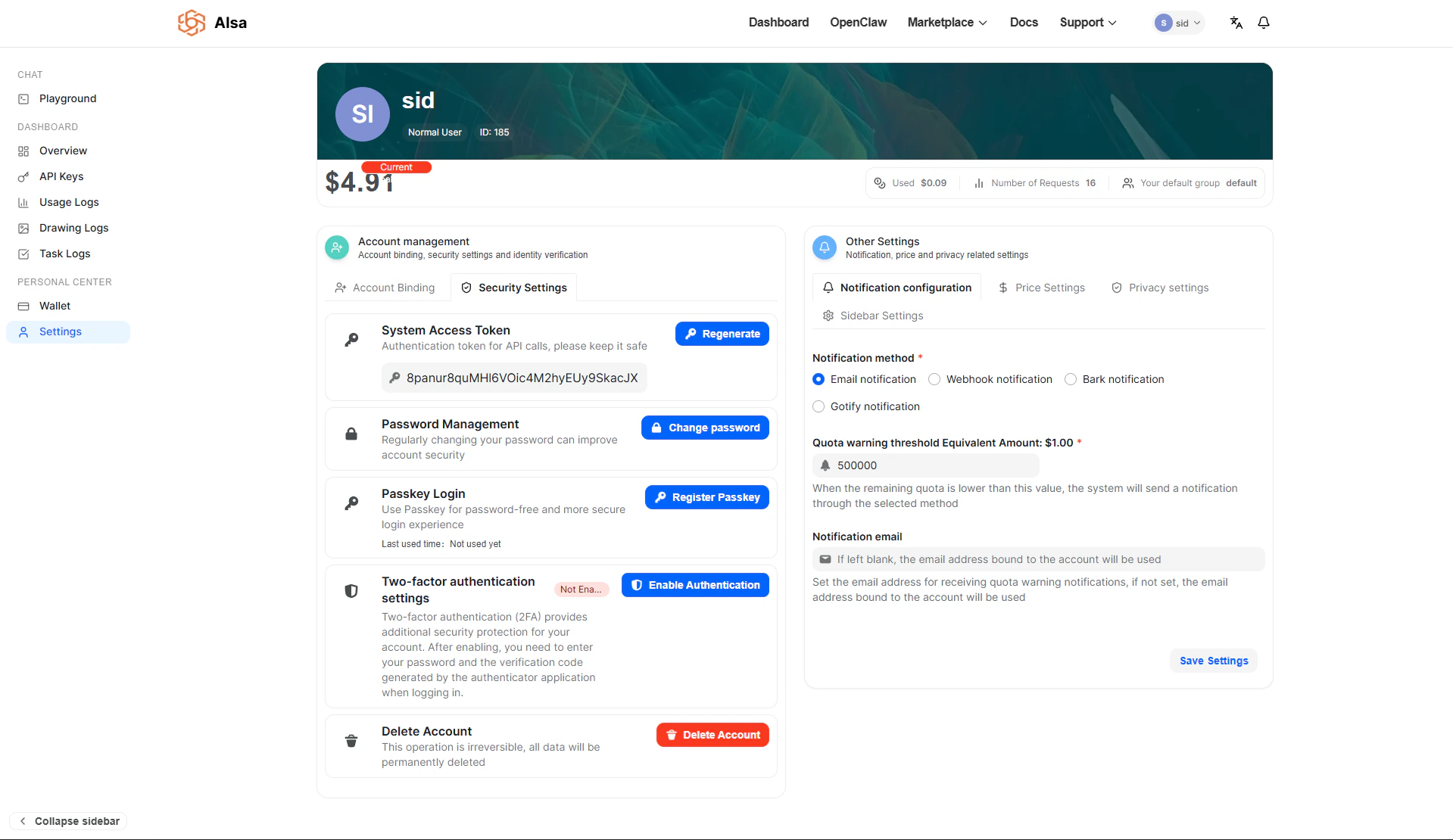 **Settings** 页面集中管理所有账户级配置,包括认证方式、安全控制、通知规则、价格保护、隐私行为和界面自定义。
该页面分为两个主要区域:
* **Account Management:** 身份、凭证和认证
* **Other Settings:** 运营、价格、隐私和 UI 控制
这些控制项会直接影响账户如何认证、用量如何计费和监控,以及 dashboard 的行为方式。
## Account Management
Account Management 区域管理认证凭证和账户级安全。
### Account Binding
Account Binding 面板允许把外部身份 provider(例如 GitHub 或 OIDC provider)绑定到账户,用于 federated authentication。
**Settings** 页面集中管理所有账户级配置,包括认证方式、安全控制、通知规则、价格保护、隐私行为和界面自定义。
该页面分为两个主要区域:
* **Account Management:** 身份、凭证和认证
* **Other Settings:** 运营、价格、隐私和 UI 控制
这些控制项会直接影响账户如何认证、用量如何计费和监控,以及 dashboard 的行为方式。
## Account Management
Account Management 区域管理认证凭证和账户级安全。
### Account Binding
Account Binding 面板允许把外部身份 provider(例如 GitHub 或 OIDC provider)绑定到账户,用于 federated authentication。
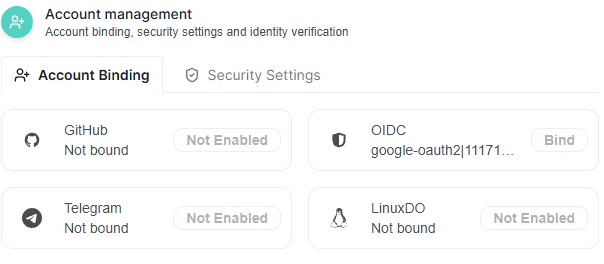 目前,账户绑定可以由管理员禁用。启用后,你可以在此绑定支持的 provider,从而简化登录和身份验证流程。
### Security Settings
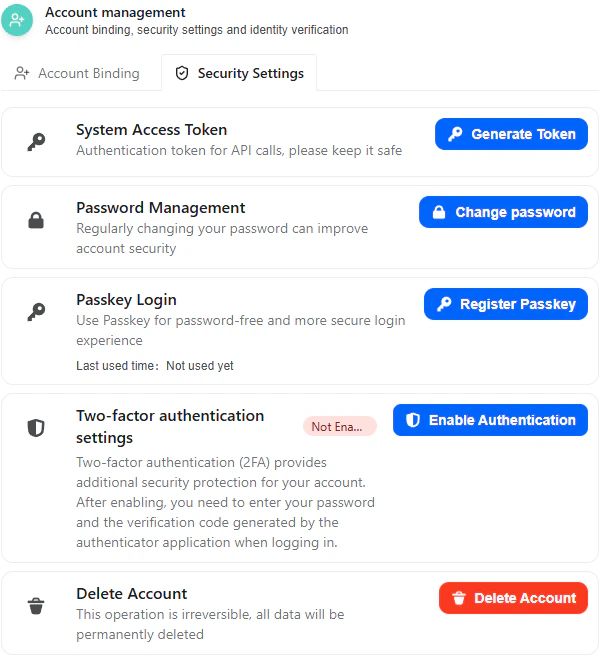
Security Settings tab 包含与认证、凭证管理和账户保护相关的所有机制。
目前,账户绑定可以由管理员禁用。启用后,你可以在此绑定支持的 provider,从而简化登录和身份验证流程。
### Security Settings
Security Settings tab 包含与认证、凭证管理和账户保护相关的所有机制。
 ### System Access Token
**System Access Token** 是一种认证凭证,用于需要用户级授权的特权或内部 API 调用。
关键特征:
* 作为 bearer token 使用。
* 授予与你账户相关 API endpoint 的访问权限。
* 必须安全保存。
* 不应暴露在客户端代码或公开仓库中。
如果 token 泄露,请立即生成新 token。生成新 token 会使旧 token 失效。
### Password Management
Change Password 弹窗要求填写:
* 原密码
* 新密码
* 新密码确认
系统会验证:
* 原密码与当前凭证匹配。
* 新密码与确认密码一致。
确认后,密码更新会立即生效。
建议定期轮换凭证,并避免在多个服务之间复用密码。
### Passkey Login
Passkey Login 支持使用基于设备的加密凭证(WebAuthn)进行无密码认证。
不过,如果你遇到错误:
```text theme={null}
Administrator has not enabled Passkey login
```
这表示 passkey 认证受管理员级控制,必须先全局启用后,单个用户才能注册 passkey。
管理员启用后:
* 你可以注册与设备绑定的 passkey。
* 认证将依赖安全的硬件支持凭证,而不是密码。
* 这可以降低 phishing 和凭证暴露风险。
## Two-Factor Authentication (2FA)
Two-Factor Authentication 会在登录时增加第二个验证因素。启用后,登录需要同时提供密码和基于时间的一次性密码(TOTP)。
### System Access Token
**System Access Token** 是一种认证凭证,用于需要用户级授权的特权或内部 API 调用。
关键特征:
* 作为 bearer token 使用。
* 授予与你账户相关 API endpoint 的访问权限。
* 必须安全保存。
* 不应暴露在客户端代码或公开仓库中。
如果 token 泄露,请立即生成新 token。生成新 token 会使旧 token 失效。
### Password Management
Change Password 弹窗要求填写:
* 原密码
* 新密码
* 新密码确认
系统会验证:
* 原密码与当前凭证匹配。
* 新密码与确认密码一致。
确认后,密码更新会立即生效。
建议定期轮换凭证,并避免在多个服务之间复用密码。
### Passkey Login
Passkey Login 支持使用基于设备的加密凭证(WebAuthn)进行无密码认证。
不过,如果你遇到错误:
```text theme={null}
Administrator has not enabled Passkey login
```
这表示 passkey 认证受管理员级控制,必须先全局启用后,单个用户才能注册 passkey。
管理员启用后:
* 你可以注册与设备绑定的 passkey。
* 认证将依赖安全的硬件支持凭证,而不是密码。
* 这可以降低 phishing 和凭证暴露风险。
## Two-Factor Authentication (2FA)
Two-Factor Authentication 会在登录时增加第二个验证因素。启用后,登录需要同时提供密码和基于时间的一次性密码(TOTP)。
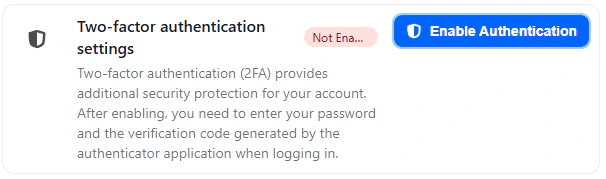 设置流程包含三个结构化步骤。
### Step 1: 扫描 QR Code
设置流程包含三个结构化步骤。
### Step 1: 扫描 QR Code
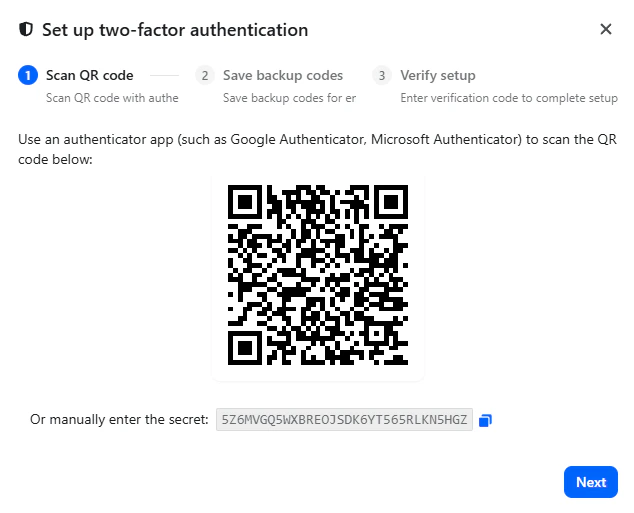 启用 2FA 时,系统会生成:
* QR code
* Manual secret key(用于手动输入)
你需要:
1. 打开兼容的 authenticator 应用,例如 Google Authenticator 或 Microsoft Authenticator。
2. 扫描页面上显示的 QR code。
如果无法扫描,也可以把提供的 secret key 手动输入 authenticator app。
该 secret key 会每 30 秒生成一个轮换的 6 位 TOTP code。
扫描或输入 key 后,继续下一步。
### Step 2: 保存备用恢复码
系统随后会生成多个 backup recovery codes。
启用 2FA 时,系统会生成:
* QR code
* Manual secret key(用于手动输入)
你需要:
1. 打开兼容的 authenticator 应用,例如 Google Authenticator 或 Microsoft Authenticator。
2. 扫描页面上显示的 QR code。
如果无法扫描,也可以把提供的 secret key 手动输入 authenticator app。
该 secret key 会每 30 秒生成一个轮换的 6 位 TOTP code。
扫描或输入 key 后,继续下一步。
### Step 2: 保存备用恢复码
系统随后会生成多个 backup recovery codes。
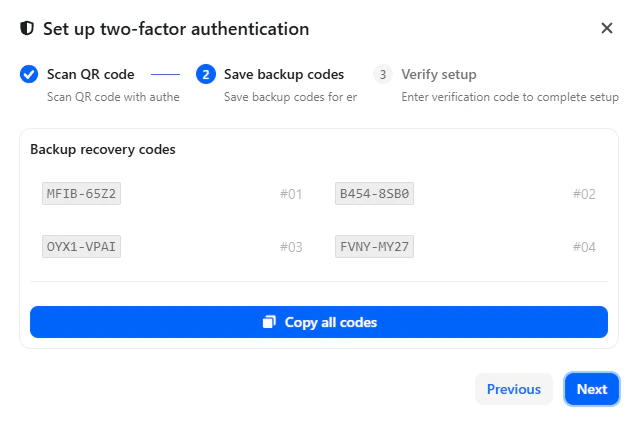 这些 codes:
* 可在你无法访问 authenticator 设备时恢复账户访问。
* 每个 code 只能使用一次。
* 应安全离线保存。
你可以使用页面提供的按钮一次性复制所有 codes。
如果没有保存这些 codes,在 authenticator 设备丢失时可能导致永久失去账户访问权限。
### Step 3: 验证设置
这些 codes:
* 可在你无法访问 authenticator 设备时恢复账户访问。
* 每个 code 只能使用一次。
* 应安全离线保存。
你可以使用页面提供的按钮一次性复制所有 codes。
如果没有保存这些 codes,在 authenticator 设备丢失时可能导致永久失去账户访问权限。
### Step 3: 验证设置
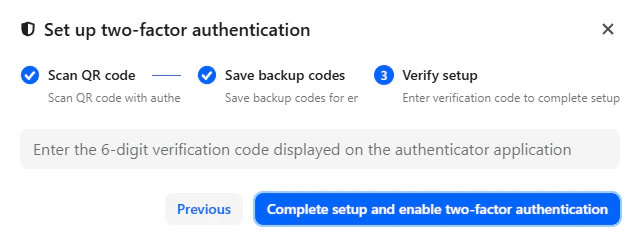 完成启用需要:
1. 输入 authenticator app 当前显示的 6 位验证码。
2. 点击 **Complete setup and enable two-factor authentication**。
如果验证码有效,2FA 会立即启用。
从此以后,登录需要:
* 账户密码
* 当前 6 位 authenticator code
## Delete Account
Delete Account 操作会永久删除你的账户和关联数据。
完成启用需要:
1. 输入 authenticator app 当前显示的 6 位验证码。
2. 点击 **Complete setup and enable two-factor authentication**。
如果验证码有效,2FA 会立即启用。
从此以后,登录需要:
* 账户密码
* 当前 6 位 authenticator code
## Delete Account
Delete Account 操作会永久删除你的账户和关联数据。
 确认流程要求:
1. 输入用户名以验证意图。
2. 点击 Confirm。
重要注意事项:
* 所有已存储数据都会永久删除。
* API keys、tokens 和账单历史会被移除。
* 该操作无法撤销。
继续前,请确保已导出所有必要数据。
## Other Settings
Other Settings 区域管理运营控制、成本保护和 dashboard 行为。
## Notification Configuration
通知设置用于定义当剩余额度达到指定阈值时,系统如何提醒你。
确认流程要求:
1. 输入用户名以验证意图。
2. 点击 Confirm。
重要注意事项:
* 所有已存储数据都会永久删除。
* API keys、tokens 和账单历史会被移除。
* 该操作无法撤销。
继续前,请确保已导出所有必要数据。
## Other Settings
Other Settings 区域管理运营控制、成本保护和 dashboard 行为。
## Notification Configuration
通知设置用于定义当剩余额度达到指定阈值时,系统如何提醒你。
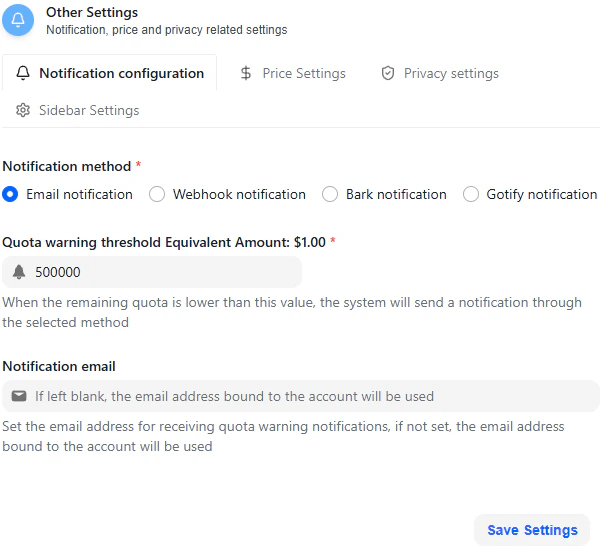 支持的通知渠道:
* Email
* Webhook
* Bark
* Gotify
### Quota Warning Threshold
你可以用等值 USD 金额定义额度预警阈值。
例如:
* 如果设置为 \$1.00,系统会在剩余额度低于该值时发送通知。
如果没有指定自定义通知邮箱,系统会使用账户绑定的邮箱。
该配置有助于避免余额耗尽导致服务意外中断。
## Price Settings
Price Settings tab 包含与模型执行相关的安全保护。
支持的通知渠道:
* Email
* Webhook
* Bark
* Gotify
### Quota Warning Threshold
你可以用等值 USD 金额定义额度预警阈值。
例如:
* 如果设置为 \$1.00,系统会在剩余额度低于该值时发送通知。
如果没有指定自定义通知邮箱,系统会使用账户绑定的邮箱。
该配置有助于避免余额耗尽导致服务意外中断。
## Price Settings
Price Settings tab 包含与模型执行相关的安全保护。
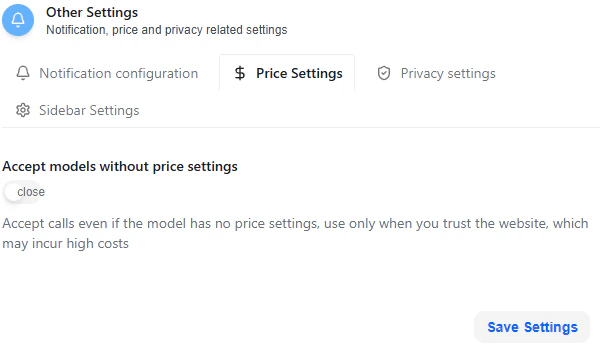 ### Accept Models Without Price Settings
禁用时(推荐默认值):
* 对未定义价格规则的模型发起 API 调用会被阻止。
启用时:
* 允许调用未配置价格的模型。
* 如果模型存在动态或外部价格,可能产生不可预测的成本。
只有在完全理解账单影响时,才应启用该设置。
## Privacy Settings
Privacy Settings tab 控制是否在日志中记录 client IP 地址。
### Accept Models Without Price Settings
禁用时(推荐默认值):
* 对未定义价格规则的模型发起 API 调用会被阻止。
启用时:
* 允许调用未配置价格的模型。
* 如果模型存在动态或外部价格,可能产生不可预测的成本。
只有在完全理解账单影响时,才应启用该设置。
## Privacy Settings
Privacy Settings tab 控制是否在日志中记录 client IP 地址。
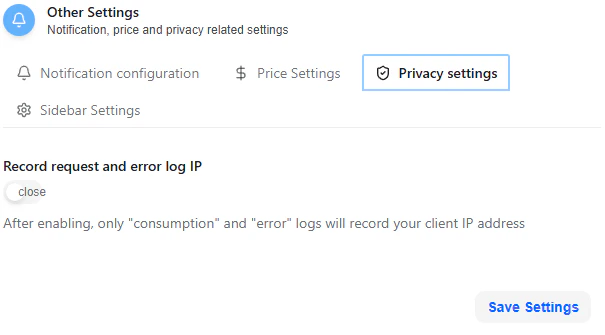 ### Record Request and Error Log IP
启用时:
* Consumption logs 会记录 client IP。
* Error logs 会记录 client IP。
这有助于:
* 安全审计
* 调试
* 调查可疑活动
禁用时:
* 这些日志中不会存储 IP 地址。
该设置用于在可观测性和隐私之间取得平衡。
## Sidebar Settings
Sidebar Settings 用于自定义界面中可见的模块。
### Record Request and Error Log IP
启用时:
* Consumption logs 会记录 client IP。
* Error logs 会记录 client IP。
这有助于:
* 安全审计
* 调试
* 调查可疑活动
禁用时:
* 这些日志中不会存储 IP 地址。
该设置用于在可观测性和隐私之间取得平衡。
## Sidebar Settings
Sidebar Settings 用于自定义界面中可见的模块。
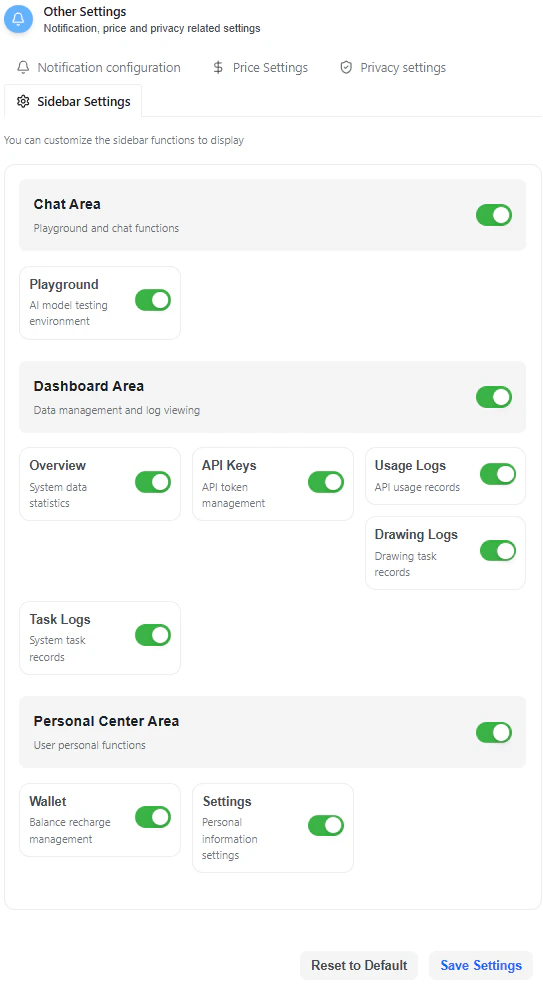 你可以启用或禁用整个区域:
### Chat Area
* Playground(AI 模型测试环境)
### Dashboard Area
* Overview
* API Keys
* Usage Logs
* Drawing Logs
* Task Logs
### Personal Center Area
* Wallet
* Settings
这些开关只控制 UI 可见性,不会禁用底层功能或权限。
点击 **Save Settings** 后更改会生效,也可以使用 **Reset to Default** 恢复默认布局。
## 运营建议
为了维护安全稳定的环境:
* 启用 Two-Factor Authentication。
* 离线保存 backup recovery codes。
* 妥善保管 System Access Token。
* 配置 quota warning,避免服务中断。
* 启用无价格设置模型前,仔细检查价格保护。
Settings 页面把所有账户级运营控制集中到一个位置,确保安全、成本感知和界面灵活性都能统一管理。
你可以启用或禁用整个区域:
### Chat Area
* Playground(AI 模型测试环境)
### Dashboard Area
* Overview
* API Keys
* Usage Logs
* Drawing Logs
* Task Logs
### Personal Center Area
* Wallet
* Settings
这些开关只控制 UI 可见性,不会禁用底层功能或权限。
点击 **Save Settings** 后更改会生效,也可以使用 **Reset to Default** 恢复默认布局。
## 运营建议
为了维护安全稳定的环境:
* 启用 Two-Factor Authentication。
* 离线保存 backup recovery codes。
* 妥善保管 System Access Token。
* 配置 quota warning,避免服务中断。
* 启用无价格设置模型前,仔细检查价格保护。
Settings 页面把所有账户级运营控制集中到一个位置,确保安全、成本感知和界面灵活性都能统一管理。