> ## Documentation Index
> Fetch the complete documentation index at: https://aisa.one/docs/llms.txt
> Use this file to discover all available pages before exploring further.
> ## Agent Instructions
> ## Agent Instructions (AIsa)
>
> - Base URLs: models `https://api.aisa.one/v1` (Gemini GenerateContent: `https://api.aisa.one/v1beta`); data APIs `https://api.aisa.one/apis/v1`. The `servers` of each operation in https://aisa.one/openapi.yaml is authoritative.
> - Auth: `Authorization: Bearer $AISA_API_KEY`. Never print, log, or commit the key.
> - MCP (preferred for agents): `https://mcp.aisa.one/mcp`, signed in with OAuth, so there is no key to paste.
> - Agent Skill: `npx skills add AIsa-team/agent-skills --skill aisa`. Fallback with the AIsa CLI: `aisa skills install aisa`.
> - Paid calls need approval first. Docs, https://aisa.one/models, https://aisa.one/api, `/v1/models`, and MCP discovery are free to read. Before any paid, dynamically priced, or high-cost call, state the exact scope, rate, and maximum USD exposure, then wait for a separate user message approving that scope and cap. A request to collect data is not approval; do not send unapproved probes. Full rule: https://aisa.one/docs/llms.txt
# Use AIsa in Grok Bot
> Add AIsa as a connector in Grok Bot with one prompt and a browser sign-in.
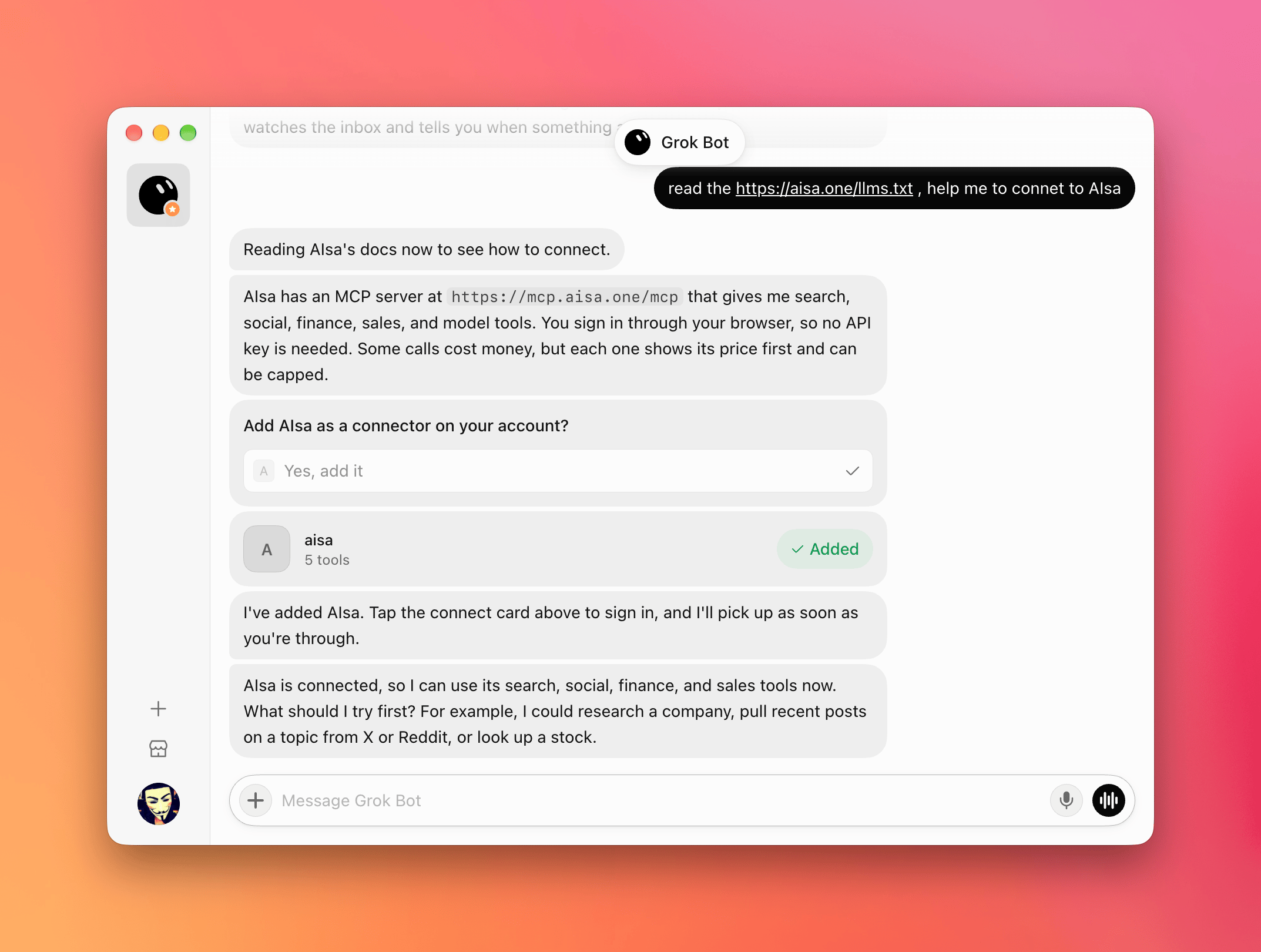
Grok Bot can add remote MCP servers as connectors on your account. Ask it to read AIsa's agent instructions, approve the connector, sign in once in your browser, and Grok Bot can call AIsa capabilities — web search, social (X, Reddit), finance, sales research, and models — on your behalf.
 ## Prerequisites
Before you start, make sure you have:
* An AIsa account ([console.aisa.one](https://console.aisa.one)) — you sign in through the browser, no API key to copy
* Grok Bot
## 1. Ask Grok Bot to connect AIsa
Start a new chat in Grok Bot and send:
```txt theme={null}
Read https://aisa.one/llms.txt and help me connect to AIsa.
```
Grok Bot reads AIsa's agent-facing instructions and finds the AIsa MCP server at `https://mcp.aisa.one/mcp`.
## 2. Add the connector
Grok Bot asks **Add AIsa as a connector on your account?** Choose **Yes, add it**.
An **aisa** connector card appears in the chat and shows as **Added**.
## 3. Sign in through the browser
Tap the **aisa** connect card, sign in to AIsa in the browser window, and approve access. Back in the chat, Grok Bot picks up the connection and confirms that AIsa is connected.
Browser sign-in keeps your API key out of the chat. You can revoke the connection at any time.
## 4. Use AIsa capabilities
Ask Grok Bot for anything AIsa can fetch, for example:
```txt theme={null}
Use AIsa to pull recent posts about AI agents from X and Reddit.
```
Paid calls show their cost before they run and can be capped. Browsing the catalog is free; data calls are billed per call to your AIsa account.
## Quick reference
| Item | Value |
| - | - |
| Setup prompt | `Read https://aisa.one/llms.txt and help me connect to AIsa.` |
| MCP server | `https://mcp.aisa.one/mcp` |
| Sign-in | **Yes, add it** → tap the **aisa** connect card → sign in in the browser |
| API key | Not needed |
| Billing | Catalog browsing is free; each data call is quoted first and billed per call |
## Troubleshooting
| Problem | Fix |
| - | - |
| Grok Bot doesn't offer to add a connector | Ask it to add `https://mcp.aisa.one/mcp` as a connector |
| Sign-in window closed before finishing | Tap the **aisa** connect card again |
| Grok Bot doesn't use AIsa for a request | Say "use AIsa" explicitly in the prompt |
| A call fails with insufficient balance | Top up in the [console](https://console.aisa.one), then ask Grok Bot to retry |
## Related
Connect Cue to AIsa with one prompt.
Add AIsa as a remote MCP server in the Grok Build CLI.
Browse the capabilities AIsa exposes to agents.
This documentation is built and hosted on [Mintlify](https://mintlify.com), a developer documentation platform.
## Prerequisites
Before you start, make sure you have:
* An AIsa account ([console.aisa.one](https://console.aisa.one)) — you sign in through the browser, no API key to copy
* Grok Bot
## 1. Ask Grok Bot to connect AIsa
Start a new chat in Grok Bot and send:
```txt theme={null}
Read https://aisa.one/llms.txt and help me connect to AIsa.
```
Grok Bot reads AIsa's agent-facing instructions and finds the AIsa MCP server at `https://mcp.aisa.one/mcp`.
## 2. Add the connector
Grok Bot asks **Add AIsa as a connector on your account?** Choose **Yes, add it**.
An **aisa** connector card appears in the chat and shows as **Added**.
## 3. Sign in through the browser
Tap the **aisa** connect card, sign in to AIsa in the browser window, and approve access. Back in the chat, Grok Bot picks up the connection and confirms that AIsa is connected.
Browser sign-in keeps your API key out of the chat. You can revoke the connection at any time.
## 4. Use AIsa capabilities
Ask Grok Bot for anything AIsa can fetch, for example:
```txt theme={null}
Use AIsa to pull recent posts about AI agents from X and Reddit.
```
Paid calls show their cost before they run and can be capped. Browsing the catalog is free; data calls are billed per call to your AIsa account.
## Quick reference
| Item | Value |
| - | - |
| Setup prompt | `Read https://aisa.one/llms.txt and help me connect to AIsa.` |
| MCP server | `https://mcp.aisa.one/mcp` |
| Sign-in | **Yes, add it** → tap the **aisa** connect card → sign in in the browser |
| API key | Not needed |
| Billing | Catalog browsing is free; each data call is quoted first and billed per call |
## Troubleshooting
| Problem | Fix |
| - | - |
| Grok Bot doesn't offer to add a connector | Ask it to add `https://mcp.aisa.one/mcp` as a connector |
| Sign-in window closed before finishing | Tap the **aisa** connect card again |
| Grok Bot doesn't use AIsa for a request | Say "use AIsa" explicitly in the prompt |
| A call fails with insufficient balance | Top up in the [console](https://console.aisa.one), then ask Grok Bot to retry |
## Related
Connect Cue to AIsa with one prompt.
Add AIsa as a remote MCP server in the Grok Build CLI.
Browse the capabilities AIsa exposes to agents.
This documentation is built and hosted on [Mintlify](https://mintlify.com), a developer documentation platform.