> ## Documentation Index
> Fetch the complete documentation index at: https://aisa.one/docs/llms.txt
> Use this file to discover all available pages before exploring further.
> ## Agent Instructions
> ## Agent Instructions (AIsa)
>
> - Base URLs: models `https://api.aisa.one/v1` (Gemini GenerateContent: `https://api.aisa.one/v1beta`); data APIs `https://api.aisa.one/apis/v1`. The `servers` of each operation in https://aisa.one/openapi.yaml is authoritative.
> - Auth: `Authorization: Bearer $AISA_API_KEY`. Never print, log, or commit the key.
> - MCP (preferred for agents): `https://mcp.aisa.one/mcp`, signed in with OAuth, so there is no key to paste.
> - Agent Skill: `npx skills add AIsa-team/agent-skills --skill aisa`. Fallback with the AIsa CLI: `aisa skills install aisa`.
> - Paid calls need approval first. Docs, https://aisa.one/models, https://aisa.one/api, `/v1/models`, and MCP discovery are free to read. Before any paid, dynamically priced, or high-cost call, state the exact scope, rate, and maximum USD exposure, then wait for a separate user message approving that scope and cap. A request to collect data is not approval; do not send unapproved probes. Full rule: https://aisa.one/docs/llms.txt
# Use AIsa in Cue
> Connect Cue to AIsa's remote MCP server with one prompt and a browser sign-in.
Cue can add remote MCP servers to a chat. Ask it to read AIsa's agent instructions, add the AIsa server, sign in once in your browser, and Cue can call AIsa capabilities — research, SEO, finance, sales, social (X, Instagram, Reddit), and more — on your behalf.
 ## Prerequisites
Before you start, make sure you have:
* An AIsa account ([console.aisa.one](https://console.aisa.one)) — you sign in through the browser, no API key to copy
* Cue
## 1. Ask Cue to connect AIsa
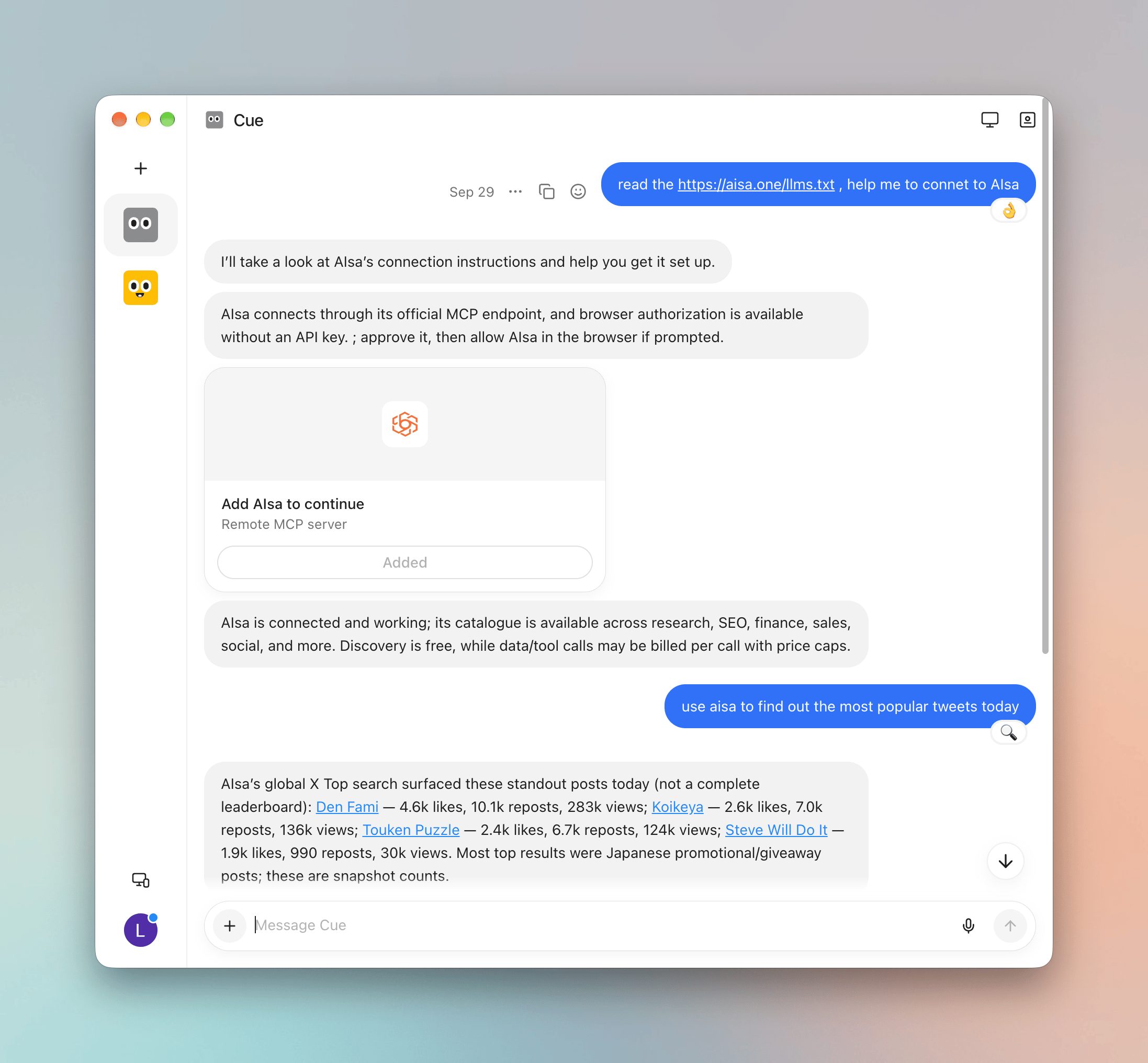
Start a new chat in Cue and send:
```txt theme={null}
Read https://aisa.one/llms.txt and help me connect to AIsa.
```
Cue reads AIsa's agent-facing instructions and connects through AIsa's official MCP endpoint with browser authorization.
## 2. Add AIsa and sign in
Cue shows an **Add AIsa to continue** card for the AIsa **Remote MCP server**. Click **Add**, then allow AIsa in the browser if prompted.
When the card shows **Added**, Cue confirms that AIsa is connected and its catalog is available.
Browser sign-in keeps your API key out of the chat. You can revoke the connection at any time.
## 3. Use AIsa capabilities
Ask Cue for anything AIsa can fetch, for example:
```txt theme={null}
Use AIsa to find out the most popular tweets today.
```
Cue picks the matching AIsa operation and returns the results in the chat. Browsing the catalog is free; data calls are billed per call to your AIsa account, with price caps.
## Quick reference
| Item | Value |
| - | - |
| Setup prompt | `Read https://aisa.one/llms.txt and help me connect to AIsa.` |
| MCP server | `https://mcp.aisa.one/mcp` |
| Sign-in | **Add AIsa to continue** card → **Add** → allow in the browser |
| API key | Not needed |
| Billing | Catalog browsing is free; each data call is quoted first and billed per call |
## Troubleshooting
| Problem | Fix |
| - | - |
| No **Add AIsa to continue** card appears | Ask Cue to add `https://mcp.aisa.one/mcp` as a remote MCP server |
| Browser authorization closed before finishing | Click **Add** on the card again |
| Cue doesn't use AIsa for a request | Say "use AIsa" explicitly in the prompt |
| A call fails with insufficient balance | Top up in the [console](https://console.aisa.one), then ask Cue to retry |
## Related
Add AIsa as a connector in Grok Bot.
Connect Meta's Muse to AIsa with one prompt.
Browse the capabilities AIsa exposes to agents.
This documentation is built and hosted on [Mintlify](https://mintlify.com), a developer documentation platform.
## Prerequisites
Before you start, make sure you have:
* An AIsa account ([console.aisa.one](https://console.aisa.one)) — you sign in through the browser, no API key to copy
* Cue
## 1. Ask Cue to connect AIsa
Start a new chat in Cue and send:
```txt theme={null}
Read https://aisa.one/llms.txt and help me connect to AIsa.
```
Cue reads AIsa's agent-facing instructions and connects through AIsa's official MCP endpoint with browser authorization.
## 2. Add AIsa and sign in
Cue shows an **Add AIsa to continue** card for the AIsa **Remote MCP server**. Click **Add**, then allow AIsa in the browser if prompted.
When the card shows **Added**, Cue confirms that AIsa is connected and its catalog is available.
Browser sign-in keeps your API key out of the chat. You can revoke the connection at any time.
## 3. Use AIsa capabilities
Ask Cue for anything AIsa can fetch, for example:
```txt theme={null}
Use AIsa to find out the most popular tweets today.
```
Cue picks the matching AIsa operation and returns the results in the chat. Browsing the catalog is free; data calls are billed per call to your AIsa account, with price caps.
## Quick reference
| Item | Value |
| - | - |
| Setup prompt | `Read https://aisa.one/llms.txt and help me connect to AIsa.` |
| MCP server | `https://mcp.aisa.one/mcp` |
| Sign-in | **Add AIsa to continue** card → **Add** → allow in the browser |
| API key | Not needed |
| Billing | Catalog browsing is free; each data call is quoted first and billed per call |
## Troubleshooting
| Problem | Fix |
| - | - |
| No **Add AIsa to continue** card appears | Ask Cue to add `https://mcp.aisa.one/mcp` as a remote MCP server |
| Browser authorization closed before finishing | Click **Add** on the card again |
| Cue doesn't use AIsa for a request | Say "use AIsa" explicitly in the prompt |
| A call fails with insufficient balance | Top up in the [console](https://console.aisa.one), then ask Cue to retry |
## Related
Add AIsa as a connector in Grok Bot.
Connect Meta's Muse to AIsa with one prompt.
Browse the capabilities AIsa exposes to agents.
This documentation is built and hosted on [Mintlify](https://mintlify.com), a developer documentation platform.