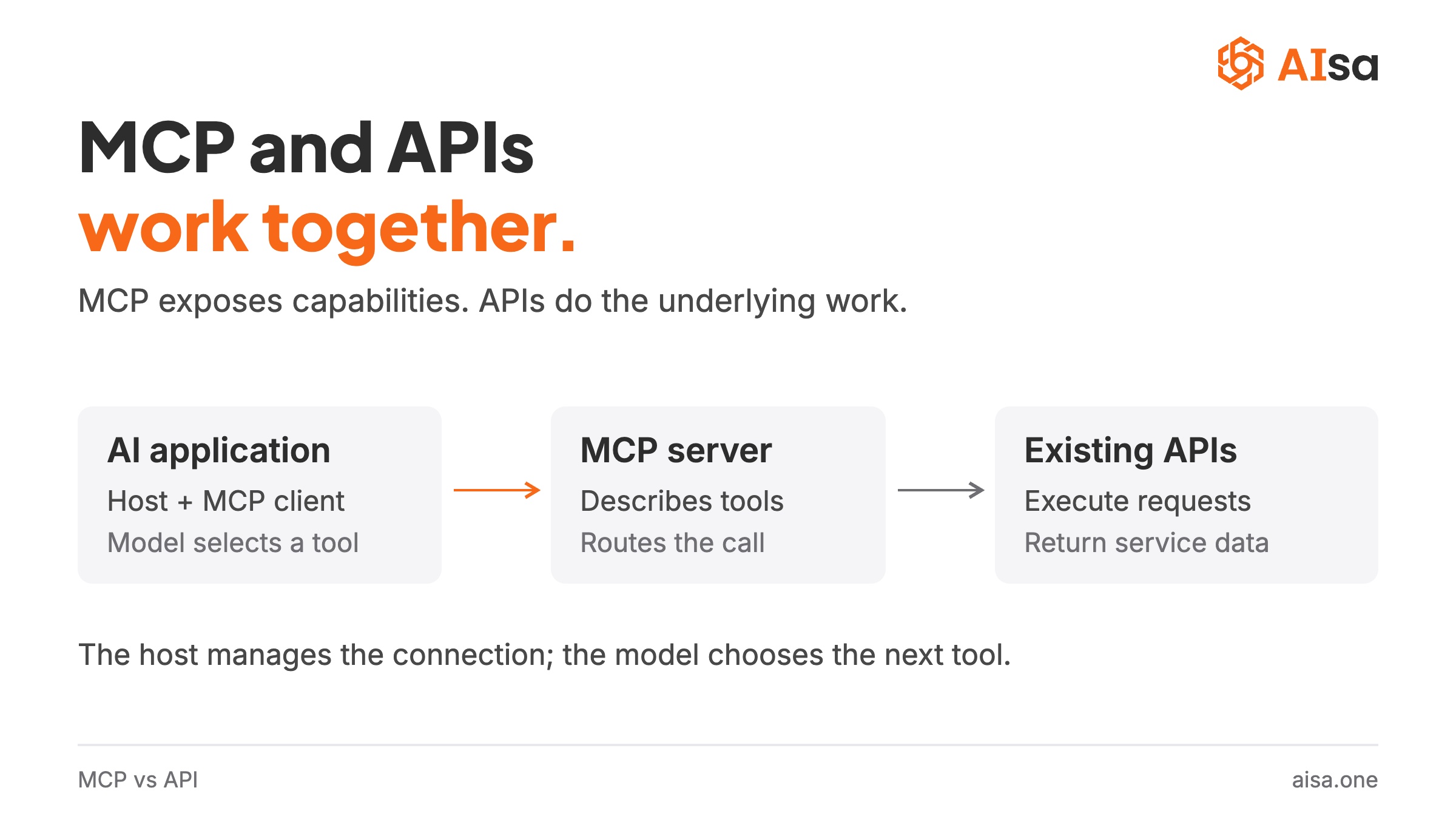
Short answer: MCP vs API is not a choice between rivals. An API is how software talks to software through fixed, developer-defined endpoints. MCP (Model Context Protocol) is how an AI application discovers and uses tools at runtime, and in most deployments those tools call existing APIs. MCP does not replace APIs. If your workflow is a fixed sequence you can draw in advance, call the API; if a model has to decide the next step from what the user asked, expose the capability through MCP.
Key takeaways
- The difference is who integrates. With an API, a developer reads the docs and writes the calls. With MCP, the client discovers tools, resources and prompts, and the model chooses among them at runtime.
- Most products use both. The API stays the foundation; an MCP server is the agent-facing layer on top, and one server can serve every MCP client.
- The protocol is the easy part. Curation, search, workflow prompts, honest fallbacks and price caps decide whether an agent can actually use an MCP server.
The rest of this article explains why, and then goes one level deeper than the usual comparison: what separates a good MCP server from a bad one, and why that matters more than the protocol choice itself.
What is an API?
An API (Application Programming Interface) is a contract that lets one program call another. When an app checks the weather, charges a card, or pulls a stock quote, it is calling an API.
REST over HTTP is the familiar case. To integrate one, a developer:
- Reads the documentation.
- Sets up authentication, usually an API key or OAuth.
- Sends requests in the expected shape.
- Parses responses and handles errors.
The strength of this model is predictability. Once written and tested, the same request can run thousands of times without any model deciding what to do next.
The cost is that every API has its own conventions: endpoints, credentials, parameters, response formats, rate limits, error codes. Ten services still mean ten integrations to maintain.
What is MCP?
The Model Context Protocol (MCP) is an open standard, introduced by Anthropic in November 2024, for connecting AI applications to external tools and data. It defines a client-server protocol on top of JSON-RPC.
An MCP server exposes three kinds of capability:
- Tools: actions the model can invoke, such as "search people at a company" or "get website traffic."
- Resources: data an application can place into the model's context, such as files or records.
- Prompts: reusable, parameterized workflow templates a user can pick from a menu.
A detail that simplified explanations often skip: the model does not connect to an MCP server by itself. The host application (Claude Code, Cursor, Claude Desktop, ChatGPT, Codex, VS Code and so on) manages the connection, discovers what the server offers, and presents those capabilities to the model. Support for MCP lives in the client, not in the model weights.
That shared discovery layer is the whole point. The client learns what a server can do by asking it, rather than by a developer reading docs and writing glue code.
MCP vs API: the practical differences
| Traditional API | MCP | |
|---|---|---|
| Primary consumer | Application code | An AI application, on behalf of a model or user |
| Discovery | Developer reads docs, writes an integration | Client discovers capabilities through the protocol |
| Who chooses the call | Logic written in code | The model, at runtime, based on the task |
| Interface | Endpoints and service-specific schemas | Self-described tools, resources and prompts |
| Auth | API key, OAuth, per service | Standard OAuth discovery (RFC 9728) or a bearer header, per server |
| Architecture | Client code calls fixed endpoints the service defined | Host app connects to a server, lists its tools, and the model calls them through the client |
| State and context | Stateless request/response; the caller keeps any context | Session-based protocol; what a server exposes as resources reaches the model only when the host application places it in context |
| Security and governance | Auth, rate limits, budgets and read-only modes enforced by the service | One entry point for agents; permissions, approvals and budgets still depend on client, server and the underlying service |
| Best fit | Predictable pipelines, high volume, tight cost control | Agent workflows where the next step depends on the user's intent |
| Transport | REST, GraphQL, gRPC | JSON-RPC over stdio or HTTP |
The architecture row is the one most comparisons collapse. With an API, a developer reads the documentation and hard-codes which endpoint to call and when. With MCP, the host application asks the server what it offers, and the model picks a tool at runtime based on the task. That dynamic discovery is what makes MCP useful for agents, and it is also why a badly designed MCP server hurts more than a badly designed API: the model, not a developer, has to make sense of it.
The M×N integration problem
Picture M AI applications that each need N external tools. If every application writes its own connector for every tool, you approach M×N integrations.
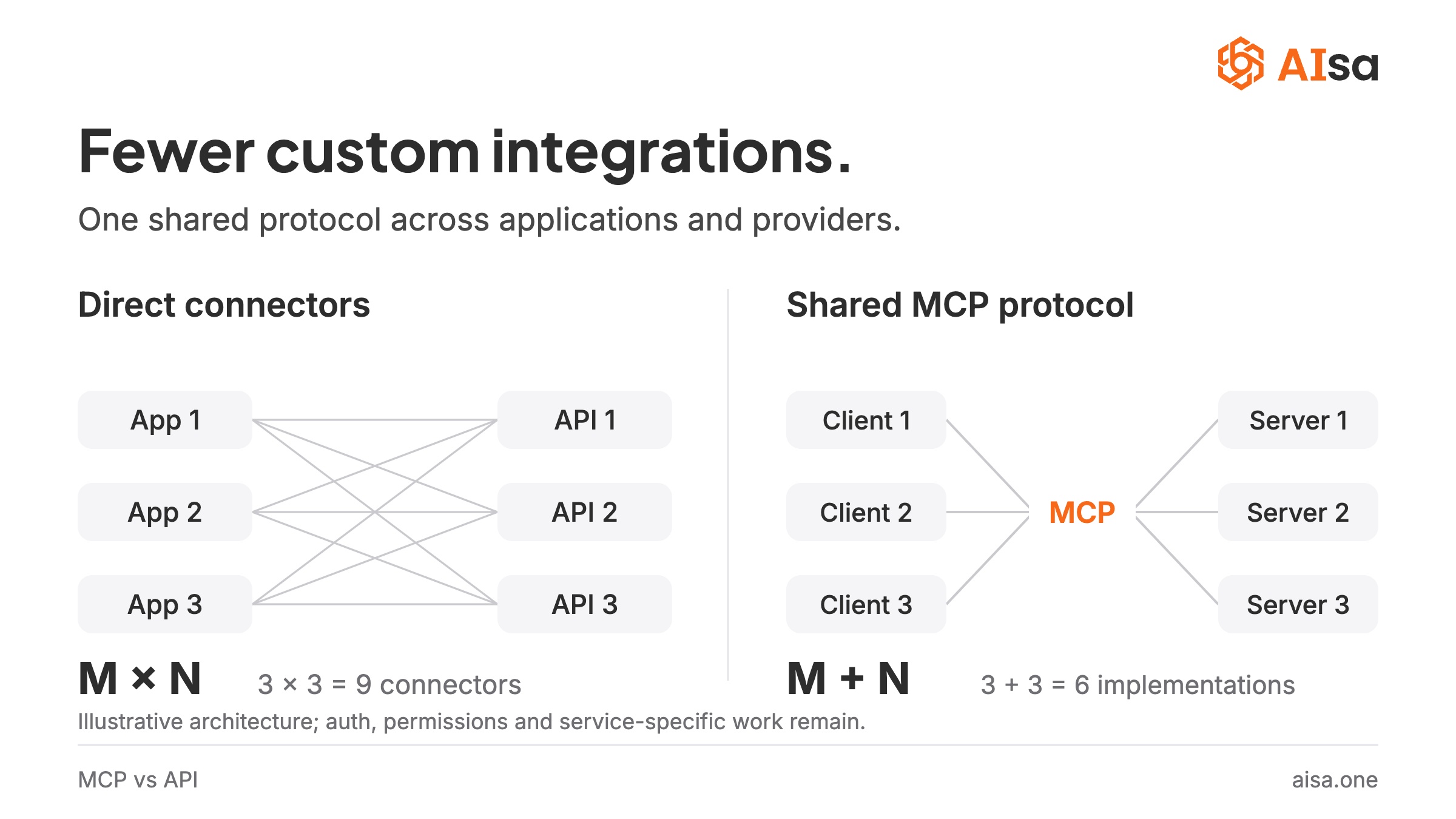
MCP moves that toward M+N: each client implements the protocol once, each tool provider ships one server.
This is an architectural goal, not a guarantee. Authentication, permissions, tool design, error handling and service-specific quirks still need real work. What MCP standardizes is how those capabilities are discovered and invoked. What it does not standardize is whether the server is any good, which is where the second half of this article goes.
Is MCP replacing APIs?
No. MCP and APIs are complementary. In most deployments an MCP server is a translator that sits on top of existing APIs and describes them in a form an AI application can discover and call. The underlying service does not change.
A single request shows the two layers in action:
- The user asks, "How much traffic does notion.so get, and who are its closest competitors?"
- The host application (say, Claude Code) has already listed the tools the MCP server offers.
- The model picks
get_website_trafficandget_similar_sitesand fills in the domain. - The MCP server calls the Similarweb REST API with the same request a developer would write, with credentials the user never sees.
- The JSON comes back through the server, and the model turns it into an answer.
In this example, step 4 is pure API and steps 2 and 3 are pure MCP. Remove the API and this server has nothing to call. Remove MCP and the developer can still hand the model these tools through the host's own function-calling format, but that description has to be written and maintained per application, which is the M×N problem above.
So the choice is rarely either-or. Build and maintain the API as the source of truth. Add an MCP server when you want agents to reach it from any MCP client without a custom integration per client.
Security and governance
MCP gives agents one entry point, which is a natural place to put controls, but the protocol itself enforces none. What an agent may do depends on three implementations: the client (whether it asks the user before a tool runs, and which tools it allows), the server (budget caps, rate limits, read-only modes) and the underlying service (API scopes and quotas, which apply whether or not the call comes through MCP). MCP's authorization spec builds on OAuth 2.1 and uses RFC 9728 protected resource metadata so a client can locate the right authorization server; it does not by itself isolate one provider from another.
Two obligations come with the extra layer. Tool results are untrusted input, so a server that returns web pages or user content should label them as such. And every layer is one more thing to audit, so keep the server's surface small; the design section below shows how.
When should you call an API directly?
Go direct when:
- The workflow is deterministic. Same steps, same order, every time.
- Latency, throughput or cost dominate. A direct call skips the model's decision loop entirely.
- You need precise control over retries, caching, batching, timeouts.
- It is part of a stable production pipeline. A nightly billing job should never ask a model which endpoint to call.
When should you use MCP?
Use MCP instead of direct API calls when:
- An agent has to use the capability while completing an open-ended task.
- The next step depends on the conversation. You cannot choose the tool in advance.
- You want one integration to work across many clients. One server, reachable from Claude Code, Cursor, Codex, Claude Desktop, ChatGPT and VS Code.
- You want a prebuilt integration in minutes. Adding a remote server is usually one command or one JSON block.
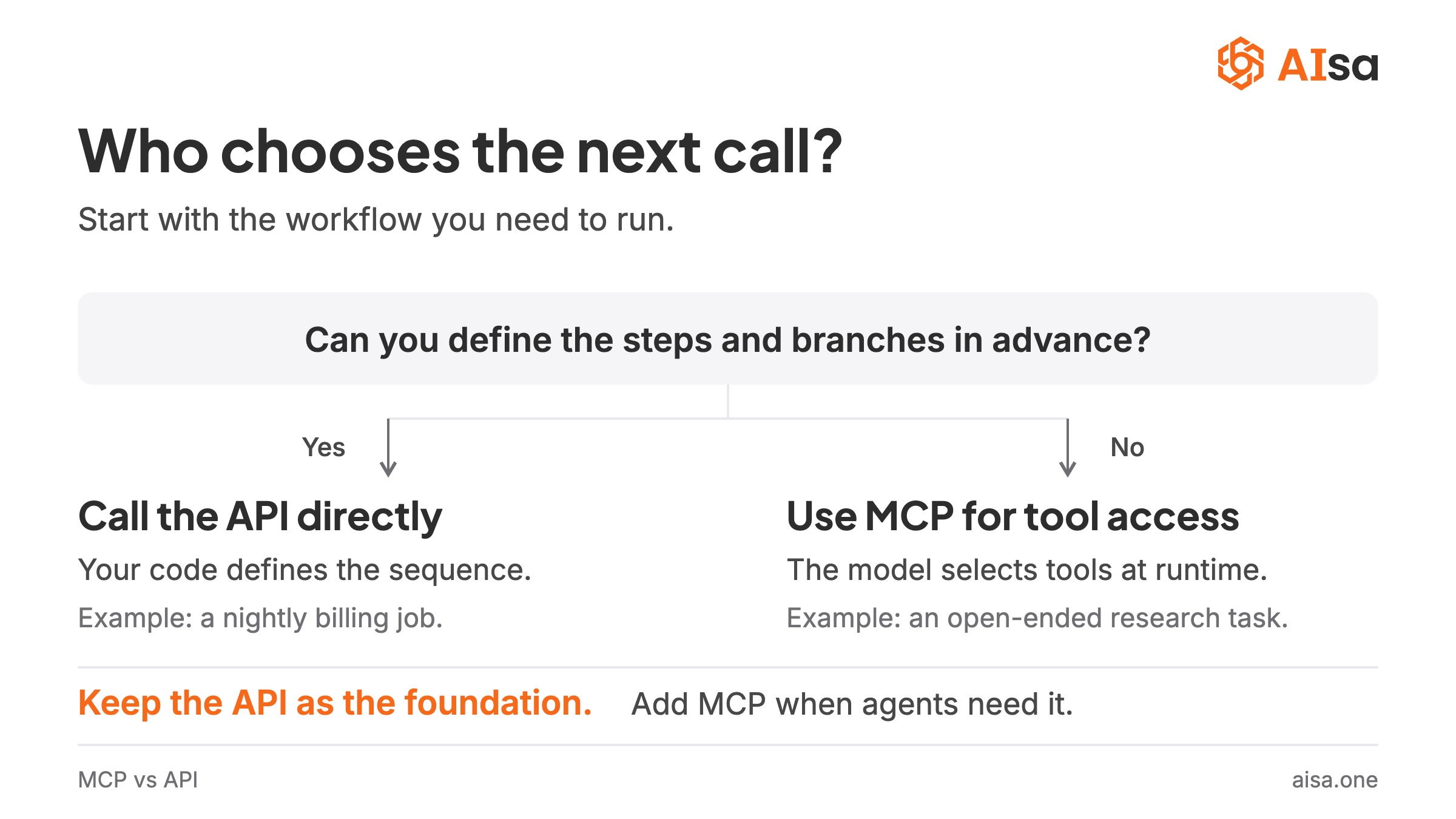
A simple decision rule
Use an API when you can draw the workflow as a fixed sequence and already know every branch.
Use MCP when the model must choose among capabilities based on the user's request.
Keep the API as the foundation. Add MCP as the agent-friendly access layer on top.
The part most comparisons skip: not all MCP servers are equal
Once you have decided that agents should reach a capability through MCP, a harder question appears. Exposing an API through MCP is easy. Exposing it in a way an agent can use well is not.
Two facts drive everything that follows:
- Agents get worse as the tool list grows. A summary of published evaluations by the vLLM Semantic Router team puts tool-selection accuracy in the 84 to 95 percent range with around 50 tools, dropping to 41 to 83 percent at around 200, and the RAG-MCP paper found retrieval precision falling sharply once a pool passes roughly 100 tools. A wrong pick costs a wasted paid call and a model round-trip.
- Every tool definition costs context. Anthropic's own worked example loaded 150,000 tokens of tool definitions before handling a single request. In our measurements a typical AIsa tool schema is roughly 400 tokens, so wrapping a 163-endpoint API one-to-one adds about 60k tokens of permanent overhead to every conversation before the user types a word.
So the naive path, "generate one MCP tool per endpoint," produces a server that technically works and practically fails. Below are the five design decisions that separate a usable MCP server from a tool dump. The examples come from AIsa's go-to-market MCP server, which bundles Apollo, Similarweb, X, Instagram, Reddit, Pinterest, YouTube and creator-discovery data behind one URL. The pattern applies to any multi-provider server.
1. Curate what is preloaded; make the rest searchable
A go-to-market agent has 163 operations available across eight providers. Most are variants of the same thing (Semrush alone has 21), reference lookups, or long-tail calls used only in deep dives. The ones an agent uses daily number 43.
Those 43 are listed in tools/list. The other 120, and in fact all 578 tools across every AIsa category, are reachable through a single search meta-tool that returns candidates with their input schema attached. The agent goes search → use in two steps, and calls get_details only when it needs pricing or edge-case notes.
The result: the server costs about 23k tokens of context, the same as connecting one vendor's official MCP server, but with eight vendors on the table. In our own 22-query test set, run against the live server on September 2, 2026, search returned the right tool in its top five 86 percent of the time.
The curated list is data, not code. One YAML file defines it, tests verify every name still exists, and the catalog, the entry prompt and the .well-known/mcp.json manifest regenerate from it. Users who want everything pinned can request ?modules=gtm-all.
2. One connection should not stop at one category
A real go-to-market task almost always crosses category lines:
| Step in the GTM task | What naturally comes next | Category | Same connection? |
|---|---|---|---|
| Found the target company's CTO | Their recent news and funding | Web search | search("company news") |
| Target is a public company | Stock price, filings, insider trades | Finance | search("insider trades", category="finance") |
| Got a verified email | Draft an outreach email | search("create draft", category="mail") | |
| Finished a competitor teardown | How the brand is cited by ChatGPT and Perplexity | SEO | search("llm mentions", category="seo") |
Curation decides what is preloaded. Search decides what is reachable. The second should never be limited by the first.
3. Ship workflows as prompts, not as documentation
MCP prompts are menu items in the client (Claude Code shows them as /aisa:competitor_teardown example.com). They cost nothing until selected and do not sit in the tool list. This makes them the right place for operational knowledge: call order, when to stop, which step is expensive and should run once, parameter pitfalls, report format, and fallbacks.
Concretely, an enrich_lead_list workflow tells the agent to send Apollo's bulk-match endpoint ten contacts per call and to deduplicate companies before enriching them. For 100 leads that is roughly 14 paid calls instead of 140. The value of a short operating guide has been measured in a neighbouring setting: in Scalekit's MCP-versus-CLI benchmark, giving an agent an 800-token document of usage tips for a CLI cut its tool calls and latency by about a third compared with the bare CLI. That test was about CLIs, not MCP prompts, so treat it as a design lesson rather than proof: a little operating knowledge in front of a tool beats none. A prompt delivers that knowledge inside the protocol.
4. Fail loudly and never substitute silently
Upstream data providers are subscription products. Any of them can return 402, time out, or have no data on a small domain. A good server handles this at two levels:
- The error body teaches. A 402 from the gateway carries an account summary, the wallet state and a subscription link, so the agent knows it is a plan issue and not an empty balance, and stops rather than retrying blindly.
- Each workflow names its fallback. Apollo unavailable → find names and titles via web search, and say plainly that no email was obtained. Similarweb unavailable → DataForSEO traffic estimates, labeled as clickstream data.
The rule that matters most: one source's data is never reported as another's. In a logged run, an agent asked for a company's CEO hit a 402 on Apollo, checked the account, switched to web search, returned the correct answer and cited the web as the source. Three calls, zero guessed parameters.
5. Put a price cap on every call
Agents loop. Some single calls cost more than three dollars. Every paid call on the AIsa server accepts a max_price_usd argument, and the gateway rejects the call before money moves if the quote exceeds it. A free account tool reports balance, plan status and usage for the last day, week and month, so the agent can budget for itself.
What this looks like in practice
Connecting is one remote URL, https://mcp.aisa.one/gtm/mcp, authorized either through the browser (OAuth) or with an API key header. In Claude Code:
claude mcp add --transport http -s user aisa https://mcp.aisa.one/gtm/mcp
After connecting, the agent sees 48 tools (43 curated plus the five meta-tools), a menu of 24 prompts, and server instructions describing the six data categories. From there the user speaks plainly: "find the people running growth and marketing at stripe.com, VP and above, with emails," or "break down notion.so: traffic, competitors, countries."
In headless test runs on September 2, 2026, nine of ten such scenarios completed end-to-end, typically with two to five paid calls and under a dollar of model cost per run. The tenth was blocked by a parameter-schema bug that has since been fixed in the spec.
The go-to-market tools require the Go-to-Market plan; a key without it receives a guided 402 on its first paid call rather than an unexplained failure. Setup for Cursor, VS Code, Claude Desktop and Codex, and current plan pricing, are in the AIsa docs.
Conclusion: MCP vs API is not either-or
- MCP does not retire APIs. In most deployments it sits in front of them, and the API remains the source of truth.
- The protocol is the easy part. Curation, search, workflows, honest fallbacks and cost caps are what make an MCP server usable by a real agent.
FAQ
Is MCP an API?
Not exactly. MCP is a protocol, not a single API. Its base layer is JSON-RPC 2.0. Individual servers expose their own tools, resources and prompts through that shared structure, and most of those tools call ordinary APIs underneath.
Is MCP just a fancy API for agents?
In one sense, yes: MCP is an interface, and its consumer is an AI application. The difference is who does the integrating. With an API, a developer reads the docs and writes the calls. With MCP, the client discovers the tools and the model chooses among them at runtime.
Why use MCP instead of direct API calls?
Use MCP when the next call depends on the user's request, when you want one integration to work across many clients, or when a non-developer needs to reach the capability from a chat interface. For a fixed pipeline, direct API calls are cheaper, faster and easier to test.
MCP vs API gateway: what is the difference?
An API gateway sits in front of APIs to handle routing, auth, rate limits and billing for application code. An MCP server sits in front of APIs to describe them to AI applications. Many MCP servers, including AIsa's, call through a gateway, so the two are layers rather than alternatives.
MCP vs RAG: are they the same thing?
No. RAG (retrieval-augmented generation) fetches documents into a model's context to ground its answer. MCP is how an application connects tools and data sources to the model. A RAG pipeline can be exposed as an MCP tool or resource; MCP itself does no retrieval.
Does MCP work with any AI model?
MCP is not tied to a model. What matters is whether the host application supports it. Claude Code, Claude Desktop, Cursor, Codex, ChatGPT and VS Code all do.
Do I need an API key to use an MCP server?
Not necessarily. A server that implements standard MCP authorization returns a 401 with resource metadata, and the client opens a browser to authorize. An API key is an alternative for scripts and CI, sent as a bearer header.
Can one MCP server expose multiple APIs?
Yes, and it is often the best design. AIsa's go-to-market server wraps eight providers. The important part is keeping the preloaded tool list small and making the rest searchable, so the agent is not overwhelmed.
Why not connect each vendor's official MCP server separately?
Each server costs 10 to 25k tokens of context and its own login. Five vendors means five authorizations and roughly 75k tokens before you start. An aggregated server with a curated list costs about the same as one vendor's server and can route around a failing provider.
Can MCP work without an API behind it?
Yes. A server can expose local files, databases or command-line tools directly. APIs are the common backend, not a requirement.
How do I stop an agent from overspending through MCP?
Pick a server that supports per-call price caps and exposes account status as a free tool. Workflows that batch instead of loop (ten contacts per call rather than one) cut spend by an order of magnitude on enrichment tasks.
Sources and further reading
- Introducing the Model Context Protocol, Anthropic
- MCP specification
- RFC 9728: OAuth 2.0 Protected Resource Metadata
- Code execution with MCP, Anthropic Engineering, November 2025
- RAG-MCP: Mitigating Prompt Bloat in LLM Tool Selection, arXiv, May 2025
- Semantic tool selection, vLLM Semantic Router
- MCP vs CLI: benchmarking AI agent cost and reliability, Scalekit, March 2026
- AIsa MCP server catalog and AIsa docs
- Related: Introducing the AIsa unified gateway · Getting started with the AIsa API · The agent-readable web
AIsa puts market, social, search, finance and go-to-market data behind one API key. Call the APIs directly for predictable pipelines, or connect https://mcp.aisa.one/gtm/mcp when an agent needs to discover and use those capabilities on its own. Get started →